NVIDIA Nsight Visual Studio Edition 5.5 is now available for download in the NVIDIA Registered Developer Program.
This release extends support to the latest Volta GPUs and Win10 RS3. The Graphics Debugger adds Pixel History (DirectX 11, OpenGL) and OpenVR 1.0.10 support as well as Vulkan and Range Profiler improvements. Nsight Visual Studio Edition version 5.5 also introduces new compute tools: The Next-Gen CUDA Debugger provides a seamless, homogeneous debugging experience for GPU+CPU debugging, while Next-Gen CUDA Profiler uses a command line interface to customize collection of counters, statistics, and derived values for given CUDA kernel launches. Customizable profiler results, including source, disassembly, kernel execution flowchart, and memory throughput, can be filtered, compared, annotated, and exported.
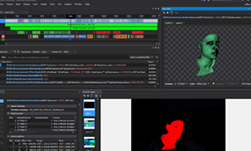
The screenshot shows the advanced features of Nsight Visual Studio Edition while debugging Ninja Theory’s Hellblade: Senua’s Sacrifice, a Direct3D 11 game based on Unreal Engine 4.
Take a look at some of the highlights in the new NVIDIA Nsight Visual Studio Edition 5.5 release:
Graphics Debugging
- Volta GPU support for the GPU Frame Debugger, Performance Dashboard, and Range Profiler.
- Pixel History for DirectX 11 and OpenGL allows you to analyze every event that contributes to the final rendered pixel.
- OpenVR support extended to v1.0.10.
- Range Profiler performance and accuracy enhancements, providing improved instant GPU bottleneck analysis.
- Windows 10 RS3 is now supported in all aspects of graphics and compute trace and profiling, on all supported GPUs, and in Microsoft Hybrid mode on laptops.
Compute Debugging
- Next-Gen CUDA debugger
- Extends Nsight’s compute debugger capabilities to the latest Volta GPUs.
- Extends Nsight’s compute debugger capabilities to TCC mode Pascals GPUs.
- Combines native CPU and CUDA GPU debugging within the same Visual Studio debugging session
Legacy CUDA debugger
- Provides support for pre-Volta GPUs and older drivers.
Analysis
- Next-Gen CUDA profiler preview
- Extends Nsight’s profiling capabilities to the latest Volta GPUs.
- Visual and command line interfaces to collect counters, statistics, and derived values for specified CUDA kernel launches.
- Customizable reports, including source, disassembly, kernel execution flowchart, and memory throughput, can be filtered, compared, annotated, and exported.
- Set and compare reports to a baseline report.
General
- Support for Windows 10 RS3.
- Support for CUDA Toolkit 9.1
Get an overview of the new features of Nsight Visual Studio Edition 5.5 and download it today!