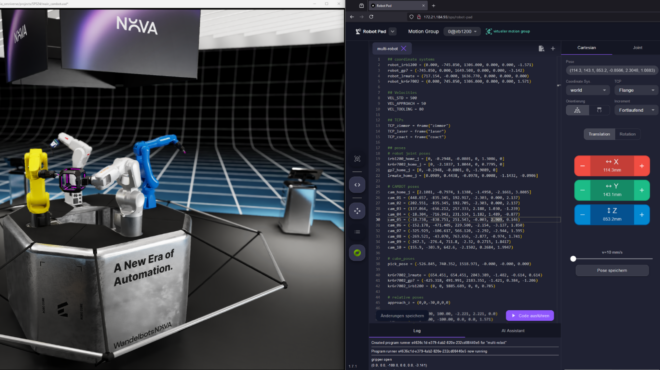
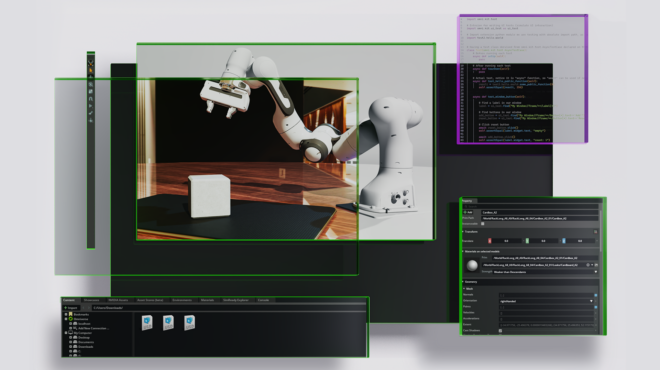
Physical AI—AI systems that perceive, reason, and act in physically grounded simulated environments—is changing how teams design and validate robots and industrial systems, long before anything ships to the factory floor. At GTC 2026, NVIDIA highlighted physical AI as a key direction for robotics and digital twins, where policies are trained and validated against physically grounded environments.
To make NVIDIA Omniverse easier to integrate into existing applications, NVIDIA is adding a modular, library‑based architecture alongside the existing platform. Core Omniverse components—RTX rendering, PhysX‑based simulation, and data storage pipelines—are being exposed as standalone, headless‑first C APIs with C++ and Python bindings: ovrtx, ovphysx, and ovstorage. For developers with established stacks, these libraries reduce the need for major architectural rewrites and let you integrate Omniverse capabilities without adopting the full Omniverse container stack.
Delivering value through modular simulation
In large robotics and industrial deployments, monolithic runtimes can make it difficult to scale simulations, deploy headlessly, or integrate with existing CI/CD systems. A library‑first architecture addresses these constraints by embedding rendering, physics, and storage directly into your existing services instead of running everything inside a single Omniverse runtime. Instead of adopting a full application framework, teams can now call Omniverse rendering, physics, and storage APIs directly from their own processes and services.

The core lineup
These libraries are designed to solve the specific integration pain points of industrial software development:
| Library | Key Capabilities | Engineering Impact |
ovrtx (EA) | High-fidelity, high-performance rendering | Integrate state-of-the art RTX real-time path-tracing and sensor simulation directly into existing applications to enable multimodal robotics perception, synthetic data generation, and many more workflows. |
ovphysx (EA) | High-speed, USD-native physics simulation | Add lightweight, hardware-accelerated physics simulation to existing applications. enabling high-speed data exchange for robotics training and real-time control-loop integration. |
ovstorage (EA) | Unified physical AI data pipelines | Enable connecting existing storage and PLM/PDM infrastructure directly to the Omniverse ecosystem via an API-driven library, enabling large-scale distributed data management and high-performance while avoiding costly manual data migrations. |
These libraries plug into existing Omniverse components for scene description (OpenUSD), simulation‑ready assets (SimReady), and application development (Omniverse Kit Framework).
Library availability and path to production
Currently, ovrtx, ovphysx, and ovstorage are in early access on GitHub and NGC. Early access builds may change APIs between releases; NVIDIA publishes migration notes and solicits feedback via GitHub and the Omniverse Discord. During early access, we are focusing on expanding coverage (physics features, sensor models) and optimizing GPU utilization. We plan a production release with API stability and long‑term support later this year.
NVIDIA is utilizing these libraries internally to power its next generation of physical AI blueprints and frameworks:
- NVIDIA Isaac Lab: Currently transitioning from the Omniverse Kit framework to a modular architecture powered by ovphysx and ovrtx. This will allow for explicit execution control, deterministic simulation, and the ability to run high-density, headless physics without UI dependencies.
- NVIDIA Omniverse DSX Blueprint: The digital twin manifestation of the DSX reference design, demonstrating to developers how to use Omniverse libraries for design, simulation, and operations across AI factory facilities and their hardware–software ecosystem.
By testing these libraries first in high-performance internal stacks and industrial blueprints, we ensure they meet the rigorous demands of enterprise-scale physical AI before they reach general availability.
Agentic orchestration: Scaling physical AI with MCP-enabled libraries
To make simulation usable from LLM‑based agents, Omniverse exposes its capabilities via Model Context Protocol (MCP) servers. These servers describe operations (for example, loading USD scenes, editing prims, stepping simulation) in a machine‑readable schema, so tools like Claude and Cursor can call them safely.
- Kit USD agents: A collection of MCP servers for Kit, USD, and OmniUI. These allow agents to browse APIs, generate scene code, and manipulate layer hierarchies or UI elements from high-level descriptions.
MCP server setup
Each MCP server can be run locally with Docker or Python. See the individual server documentation: USD Code MCP, Kit MCP, OmniUI MCP.
Quick start (Docker – Recommended):
# Set your NVIDIA API key first
export NVIDIA_API_KEY=your_api_key_here  # Linux/macOS
# or
set NVIDIA_API_KEY=your_api_key_here     # Windows

# Build wheels and start all MCP servers
cd source/mcp
./build-wheels.sh all  # or build-wheels.bat all on Windows
docker compose -f docker-compose.ngc.yaml up --build
This uses the NVIDIA cloud-hosted embedder and reranker services via your API key. No local GPUs required.
To scale these workflows, developers can utilize NemoClaw, a new infrastructure stack for the OpenClaw community, to deploy secure, always-on autonomous agents within isolated sandboxes protected by policy-based guardrails. With MCP servers handling the low‑level remote procedure calls (RPCs) to Omniverse, teams can focus on defining agent behaviors and guardrails instead of hand‑wiring every simulation API call.
Case study: Optimizing NVIDIA Isaac Lab with modular libraries
The move toward a library-first architecture is best demonstrated by the current engineering evolution of NVIDIA Isaac Lab. As a high-performance robotics simulation framework for reinforcement learning (RL), Isaac Lab requires extreme scalability and deterministic control.
With Isaac Lab 3.0 Beta, NVIDIA has transitioned Isaac Lab’s foundational layer from the monolithic Kit framework to a modular, multi-backend architecture.
- On the physics side, developers can now choose between
`ovphysx`, a standalone library wrapping the PhysX SDK, or a Kit-less Newton backend powered by MuJoCo-Warp, depending on their simulation requirements. - On the rendering side, a pluggable renderer system supports OVRTX, Isaac RTX, Newton Warp, and lightweight visualizers like Rerun and Viser.
This release is currently in beta with general availability planned for later this year. This multi-backend design significantly changes how NVIDIA composes simulation stacks internally, moving from a single runtime to a set of interchangeable physics and rendering backends.
Implementation details: Solving the “framework lock”

For the Isaac Lab engineering team, the move to standalone libraries solves three primary architectural bottlenecks:
- Explicit execution control: Standalone APIs replace the Kit runtime loop, allowing developers to manually trigger physics steps. This ensures deterministic execution and eliminates framework-induced latency.
- Decoupled update frequencies: Modular libraries enable independent stepping of simulation components. High-frequency sensors (IMUs) and lower-frequency vision systems can now operate at their native rates within one environment.
- Scalable, headless deployment: Decoupled libraries provide a minimal binary footprint for Linux clusters. Developers can execute high-density physics without UI dependencies, attaching
ovrtxfor debugging or visualization.
By stripping away the platform plumbing, Isaac Lab can leverage tensorized data exchange for direct, high-speed access to simulation states via GPU buffers (e.g., positions/velocities as PyTorch tensors without host copies).
Augmenting established stacks: Industry adoption
Industrial digital twin and robotics simulation partners are starting to adopt Omniverse libraries in their workflows, either in pilots or early production integrations.
For partners such as ABB Robotics, Adobe, Cadence, PTC, Siemens, and Synopsys, the primary value lies in the ability to incorporate foundational RTX rendering, high-fidelity PhysX simulation, and native OpenUSD support without a full architectural replatforming.
Robotics simulation leaders like ABB Robotics are embedding Omniverse into RobotStudio, building on its industry‑trusted virtual controller, offline programming, and commissioning workflows,to train and validate industrial robots with physical AI at scale, while PTC is connecting Onshape directly into Isaac Sim for cloud‑native robot design, testing, and deployment. Global industrial software giants like Siemens are integrating Omniverse libraries to build industrial digital twins at scale.
Decision guide: Framework or library?
Choosing the right integration path depends on the specific requirements of your application stack.
Decision guide: When to choose a modular library versus the full platform.

- When to use Omniverse libraries: Use Omniverse libraries when you want to plug physical AI capabilities into an existing 3D or CAD application, or into a new workflow that needs high‑fidelity physics or sensor rendering without adopting a full Omniverse stack. They are also a good fit for lightweight, often headless deployments or specialized autonomous agents where you need focused functionality with minimal dependencies and complexity.
- When to use Omniverse Kit framework: Use Omniverse Kit when you want to build a feature‑rich OpenUSD application or service that needs a full UI, interactive viewports, and tight coordination across rendering, physics, and other Omniverse capabilities. It is ideal when you do not already have an application, need builtin menus and windowing, and want a standard app framework that wires together many extensions and libraries for you so you can focus on domain logic instead of low‑level integration.
Getting Started: Wiring physical AI into your pipeline
One of the biggest advantages of Omniverse libraries, specifically ovrtx and ovphysx, is that their availability is decoupled from the overarching Omniverse Kit framework. Both libraries offer thin Python binding built over their C APIs, making them easy to integrate into your own applications.
Because they support DLPack, you can interact with them using zero-copy transfer data exchange directly alongside popular frameworks like NumPy, PyTorch, and Warp.
How to get started
Rendering a frame with ovrtx :
ovrtx provides lightweight access to RTX hardware-accelerated rendering. You can load a scene, render a frame, and save it to a PNG file using NumPy in just 10 lines of code.
*Requirements: The Python bindings use ctypes and require no dependencies other than the C library, working across Python 3.10+ environments.
from ovrtx import Renderer
import numpy as np
from PIL import Image

# 1. Create the renderer with optional configuration
renderer = Renderer()

# 2. Ingest the scene
renderer.add_usd("/path/to/robot.usda")

# 3. Step the sensor simulation and retrieve rendered outputs
products = renderer.step(render_products={"/Render/Product_Robot_01"}, delta_time=1.0/60)

# 4. Save rendered output into PNG via numpy DLPack and PIL
for frame in products["/Render/Product_Robot_01"].frames:
    with frame.render_vars["LdrColor"].map(device="cpu") as mapping:
        pixels = np.from_dlpack(mapping.tensor)
        Image.fromarray(pixels).save("robot_pose.png")
What is happening here?
- Efficient and simple scene creation:
ovrtx_add_usd()loads the given USD layer into the stage using advanced caching and streaming for efficient loads. - Decoupled stepping: The
ovrtx_step()command advances the renderer deterministically using a provided delta time, giving the application complete control over render execution. - Semantic-aware tensors: The context manager
(with… as mapping:)automatically handles mapping the rendered variables like RGBA or depth to CPU or GPU memory, with the result shared easily with NumPy Unmapping and cleanup is handled automatically when the tensors are garbage collected.
For more information, visit the ovrtx Github repository.

The minimum viable physics loop with ovphysx
While ovrtx handles the visuals, ovphysx acts as the bridge between the core PhysX SDK and your USD/Tensor environments.
To run a physics simulation, your application flow will follow five fundamental asynchronous steps, driven by the core API:
- Instance lifescycle:
ovphysx_create_instance
In order to load USD scenes, run simulations, or access the tensors, you must first create an instance. - Scene ingestion:
ovphysx_add_usd
This step defines your physical world by loading your actors, joints, and physics materials from a USD file into the runtime stage. - Simulation advancement:
ovphysx_step
This is the core of your simulation loop, advancing the physics deterministically forward over time. - Synchronization:
ovphysx_wait_op
Because the library uses an asynchronous, stream-ordered execution model, you must use operations to ensure your stepping or USD loading has completed. This prevents race conditions when you try to read or write data. - State access: r
ead_tensor_binding/write_tensor_binding
Tensor bandings are the scalable I/O mechanism for the library. This step allows you to observe physical states (like velocities and positions) and exert-control (like applying forces) in a tensorized format.
For more information, visit the ovphysx Github repository.
Connecting data sources with ovstorage
While ovrtx and ovphysx provide the rendering and physics for your application, ovstorage acts as the unified storage layer. It directly connects your PLM or existing repositories to the Omniverse ecosystem via a unified API layer. This eliminates sync jobs and costly data migrations, enabling USD workflows without moving files.
Designed for Kubernetes-ready, headless deployment, ovstorage gives you total architectural control, scaling microservices independently to meet production demands without the constraints of a monolithic legacy stack.
How to get started:
- Integrate existing infrastructure: Connect Omniverse to current storage backends (such as S3 or Azure) to maintain version control in place.
- Deploy service adapters: Rapidly build custom adapters to expose any storage backend to the unified API without modifying client applications.
- Ensure compliance: Use conformance-tested adapters to meet specific data residency, sovereignty, and compliance requirements while preserving a single source of truth.
These are just the initial capabilities of ovstorage, with more on the horizon.

ovstorage implementation.For more information, visit the ovstorage resources on NVIDIA NGC.
The future of modular physical AI
NVIDIA Omniverse is becoming a set of modular building blocks—libraries and frameworks you can compose into your own physical AI stack. By providing high-performance primitives like ovrtx and ovphysx, NVIDIA is enabling developers to build the next generation of autonomous systems within the ecosystems they already own.
While the Omniverse Kit framework remains the ideal choice for developers building entirely new, feature-rich applications, these standalone libraries empower teams to innovate within their existing stacks. Early use by industrial ISVs and within Isaac Lab suggests that modular libraries make it easier to integrate simulation into existing products and training pipelines.
Get started today
Take these next steps to begin integrating modular physical AI into your existing applications:
- Install Omniverse libraries: Download
ovrtxandovphysxvia GitHub, and ovstorage from NVIDIA NGC to begin integrating physical AI into your pipeline. - Learn more: Access the latest GTC 2026 sessions and tune into our upcoming OpenUSD Insiders Livestream for a deep dive into Omniverse development.
- Engage with the community: Share your feedback and collaborate with other developers on the Omniverse Developer Discord to help shape the future of enterprise-ready physical AI.