Exponentially growing computational demand is driving power usage higher and pushing data centers to their limits. With facilities power constrained, extracting the most performance per provisioned watt of power is crucial to optimize throughput from a data center.
To help users and system administrators extract the most performance out of power-limited data centers, NVIDIA has released data center energy optimized power profiles. This new software feature released with NVIDIA Blackwell B200 is aimed at improving energy efficiency and performance. It provides coarse-grain user control for HPC and AI workloads leveraging hardware and software innovations for intelligent power management.
As explained in this post, the resulting workload-aware optimization recipes maximize computational throughput while operating within strict facility power constraints. The phase-1 Blackwell implementation achieves up to 15% energy savings while maintaining performance levels above 97% for critical applications, enabling an overall throughput increase of up to 13% in a power-constrained facility.
One-click GPU configuration tuning for optimal efficiency
While experts can achieve energy efficiency savings similar to these, the work required is significant. Tuning for optimal efficiency requires adjusting many separate power and frequency controls. Settings that impact efficiency include, but are not limited to Total GPU Power, GPU compute and memory frequencies, NVLink power states, and L2 cache power. Tuning all of these parameters is a time consuming process, and some of them require root-level access not available to users.
Power profiles encode NVIDIA expert knowledge into the tool, removing the complexity of manual tuning while enabling large energy efficiency gains with minimal user effort.
The four architecture layers of power profiles
Power profiles include four architecture layers: Foundational Hardware and Firmware, Profile Abstraction Framework, Management and Monitoring APIs, and NVIDIA Mission Control.
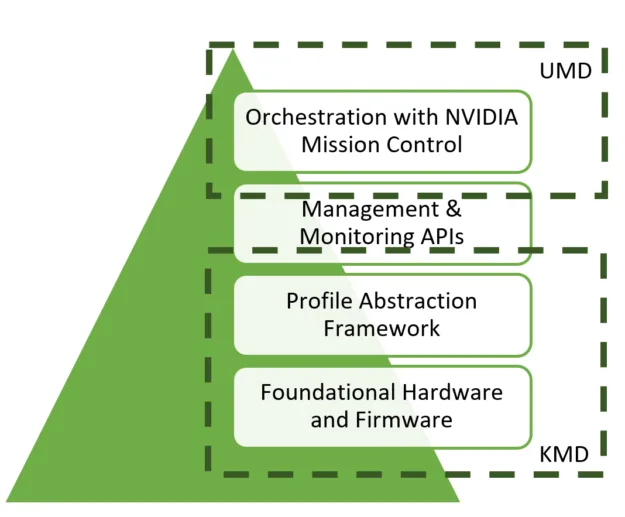
Layer 1 – Foundational Hardware and Firmware: Contains the hardware and firmware controls that power profiles manipulate to optimize performance and power consumption. At this layer, controls to adjust GPU SM clock, memory clock, power limit, and other features are exposed.
Layer 2 – Profile Abstraction Framework: The core of the innovation in power profiles, or “the brain.” It takes high-level user input from Layer 3 and transforms it into a recipe of optimal settings. Inputs include user goals:
- Is the goal Maximum energy efficiency (Max-Q) or maximum performance (Max-P)
- What is the job type: AI training, AI inference, or HPC
- What are the job properties (memory- or compute-bound, for example)
The NVIDIA engineering team incorporates workload and hardware/firmware expertise during post-silicon activities to define and fine-tune Layer 1 control configurations, generating optimized profiles. This ensures optimal performance by intelligently biasing power based on the workload.
For example, in a memory-bound task, the power bias shifts toward memory performance, prioritizing memory and I/O speed over compute clock speed. To handle conflicts and ensure a stable configuration, an arbitrator resolves them and informs the user of the conflict and which settings were selected.
Layer 3 – Management and Monitoring APIs: Enables both users and administrators to set power profiles. At this level, administrators have access to Redfish APIs for “out of band” management across the entire data center. This enables setting cluster wide preferences and responding to external events, such as a utility provider asking for reduced power consumption.
Users can access power profiles through NVIDIA tools and APIs, such as NVSMI, DCGM, and BCM. However, most are expected to use scheduler interfaces like the following SLURM example where a MAX-Q profile for a training job is turned on.
sbatch --partition-gpu partition --power-profile MAX-Q-Training
--nodes=4 --ntasks-per-node 8 training_job.slurm
Layer 4 – Orchestration with NVIDIA Mission Control: Enables a higher-level, simplified interface to access the entire power profiles software stack. This all-in-one management platform simplifies the usage of power profiles and enables coordination with other power control tools and monitoring capabilities such as building monitoring systems. In addition, Mission Control provides real-time dashboards to monitor the impact of power profiles.
Performance gains and energy savings
Figure 3 shows the increase in data center throughput enabled by the Max-Q model of power profiles for HPC and AI applications for 1,000 W NVIDIA B200 GPUs. Power savings of up to 15% are achieved with, at most, a 3% performance loss.
These resulting power savings enable provisioning more GPUs, resulting in up to a 13% overall increase in data center throughput. All power consumption, GPU, CPU, and other components are considered in this calculation.
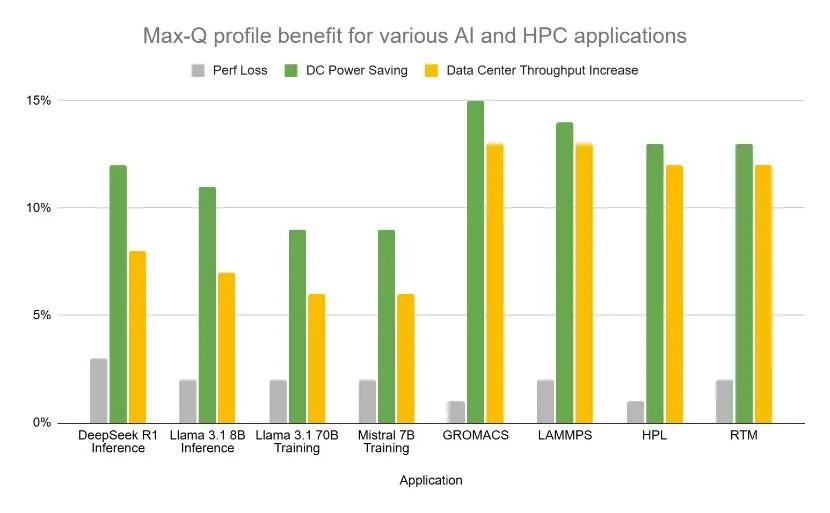
Table 1 compares frequency scaling to power profiles. Frequency scaling is changing the GPU compute clock frequency only, which is the most common way currently to save power. Power profiles save as much or more power as frequency scaling for inference and training with a 7-9% lower performance loss. Frequency scaling impacts performance of these compute sensitive workloads significantly. Power profiles by contrast saves power in other parts of the system that have a minor performance impact for compute sensitive workloads.
| NVIDIA Blackwell B200 | Performance decrease | Data center power savings |
| Frequency scaling | 10% | 5% |
| Training profiles | 1% | 5% |
| Inference profiles | 3% | 8% |
Figure 4 shows the impact of Max-P profiles using a 1,000 W NVIDIA B200 GPU. For applications that are power limited at TDP, power profiles enable increased performance by reducing power to parts of the GPU that do not limit performance and enabling performance limiting parts of the GPU to run at a higher frequency. This feature delivers a 2-3% increase in performance at the same power. The mode is useful when data centers are not power constrained (overnight, for example).

Next-generation power profiles
While the first deployment covered AI training, inference and HPC profiles, power profiles will continue to evolve following the road map outlined in Figure 5. The next generation will incorporate additional system features, including the CPU, NVSwitch, and NICs. After full system profiles are available, dynamic capabilities will be added leveraging live telemetry and machine learning to recommend profiles based on workload identified. They will later enable per-application self-tuning within the power-bound allocated to an application.
Finally, disaggregated inference will be incorporated, enabling power to be moved between different compute tasks based on evolving bottlenecks and live compute demands.

Get started with power profiles
Power profiles increase the amount of work a power-limited data center can accomplish by up to 13%. They also reduce the effort and simplify the process of tuning applications for power and energy. This frees experts to perform other tasks and enables non-experts to achieve significant energy efficiency savings.
With data center power becoming more constrained each year and the ever growing importance of energy efficiency, NVIDIA is committed to meeting this challenge. We will continue to increase the capabilities of power profiles, reduce the skill needed to use them, and invest in other power and energy tools to enable extraction of the maximum computational capabilities per watt of power.
To learn more, see Data Center Energy Optimized Power Profiles and reference the technical documentation.
Acknowledgments
Contributors to the research presented in this post include Apoorv Gupta, Ian Karlin, Sudhir Saripalli, Janey Guo, Tip Fei, Evelyn Liu, Harsha Sriramagiri, Harish Kumar, Milica Despotovic, Chad Plummer, Douglas Wightman, and Sidharth Nair.