Validating AI systems requires benchmarks—datasets and evaluation workflows that mimic real-world conditions—to measure accuracy, reliability, and safety before deployment. Without them, you’re guessing.
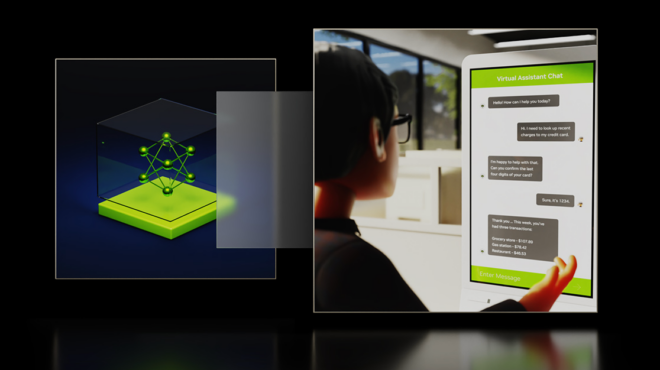
But in regulated domains such as healthcare, finance, and government, data scarcity and privacy constraints make building benchmarks incredibly difficult. Real-world data is locked behind confidentiality agreements, is fragmented across silos, or is prohibitively expensive to annotate. The result? Innovation stalls, and evaluation becomes guesswork. For example, government agencies deploying AI assistants for citizen services—like tax filing, benefits, or permit applications—need robust evaluation benchmarks without exposing personally identifiable information (PII) from real citizen records.
This blog introduces an AI-driven, privacy-preserving evaluation workflow that can be applied across industries to benchmark LLMs safety and efficiency. We’ll use a healthcare example to illustrate the process, but the same approach works for any domain where data privacy is critical. You’ll learn how to generate domain-specific synthetic datasets in minutes using NVIDIA NeMo Data Designer and build reproducible benchmarks with NVIDIA NeMo Evaluator—without exposing a single real record.
Quick links to the model and code
- NeMo Data Designer microservice
- NeMo Evaluator microservice
- NVIDIA Nemotron models on Hugging Face or NVIDIA NIM APIs on NVIDIA Build.
What you’ll get in the end: a privacy-preserving data-evaluation pipeline
This blog demonstrates how to build a privacy-preserving evaluation workflow where sensitive data must be protected.
You will learn how to:
- Generate realistic, privacy-safe triage notes based on structured prompts and domain constraints.
- Score and filter synthetic data for quality.
- Evaluate large language model (LLM) predictions using automated benchmarks across multiple GPUs.
To illustrate the process, we’ll use one real-world example—predicting an Emergency Severity Index (ESI) for ER triage notes—without exposing a single patient record.
Example: synthetic data for emergency room triage prediction
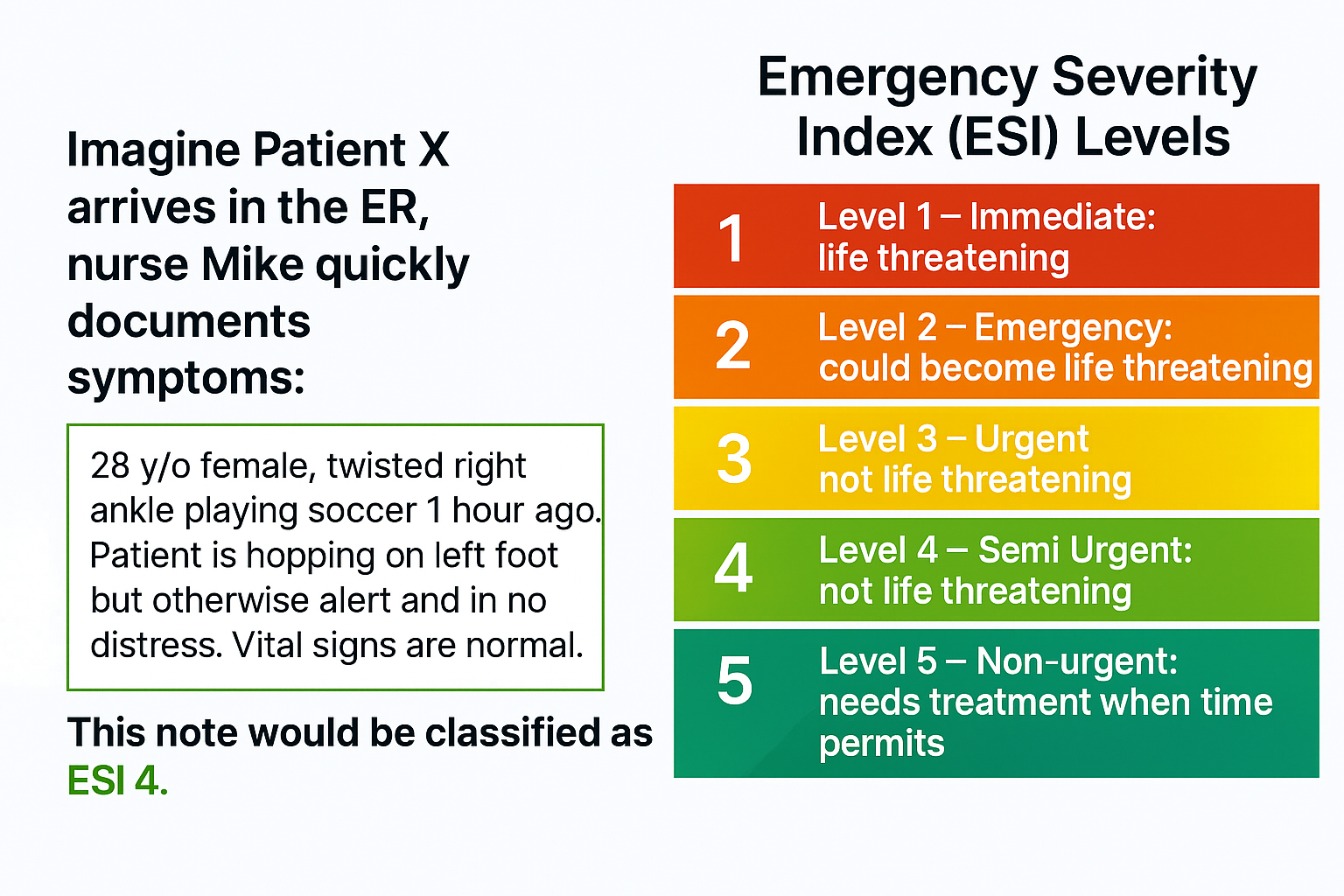
Emergency departments operate under intense pressure. Every second counts, and accurate triage determines whether a patient gets immediate care or waits. AI can help by predicting ESI levels from clinical notes, enabling faster prioritization and reducing clinician workload (See Figure 1 below). But building such a system isn’t straightforward. Limitations include:
- Data access: Real triage notes are confidential and protected under Health Insurance Portability and Accountability Act (HIPAA) and other privacy regulations. Hospitals cannot simply share patient records for model training or evaluation. Even when limited datasets are available, they’re often incomplete, inconsistent, or locked behind institutional agreements.
- Annotation cost: Labeling thousands of notes with ESI levels requires clinical expertise. Manual annotation is slow, expensive, and prone to variability. For many developers, this step alone can stall a project for months.
- Data scarcity: Rare conditions and edge cases are underrepresented in real-world datasets, making it hard to build models that generalize. Without enough examples, models risk bias and brittle performance—unacceptable in life-critical environments like emergency care.
These challenges create a paradox: AI could transform triage, but the very data needed to build and validate these systems is inaccessible. This is where synthetic data and automated evaluation workflows come in.
Why synthetic data matters
Synthetic data has rapidly matured into a vital resource for building reliable AI systems. Unlike real-world data, which is limited by what has happened, synthetic data allows you to generate what could happen—covering rare edge cases and diverse scenarios that strictly comply with privacy regulations. It offers high-quality, domain-specific examples created with guidance from subject matter experts and advanced compound AI systems. In industries where privacy, compliance, and data scarcity limit access to real-world data, synthetic data provides a breakthrough—enabling teams to train and validate models safely and efficiently.
Unlike traditional data collection, the process of generating synthetic data dramatically accelerates development timelines—developers can now create or update datasets and benchmarks in hours rather than months, supporting faster innovation and more responsive AI solutions.
How to get started:
Step 1: Generate synthetic data with NeMo Data Designer
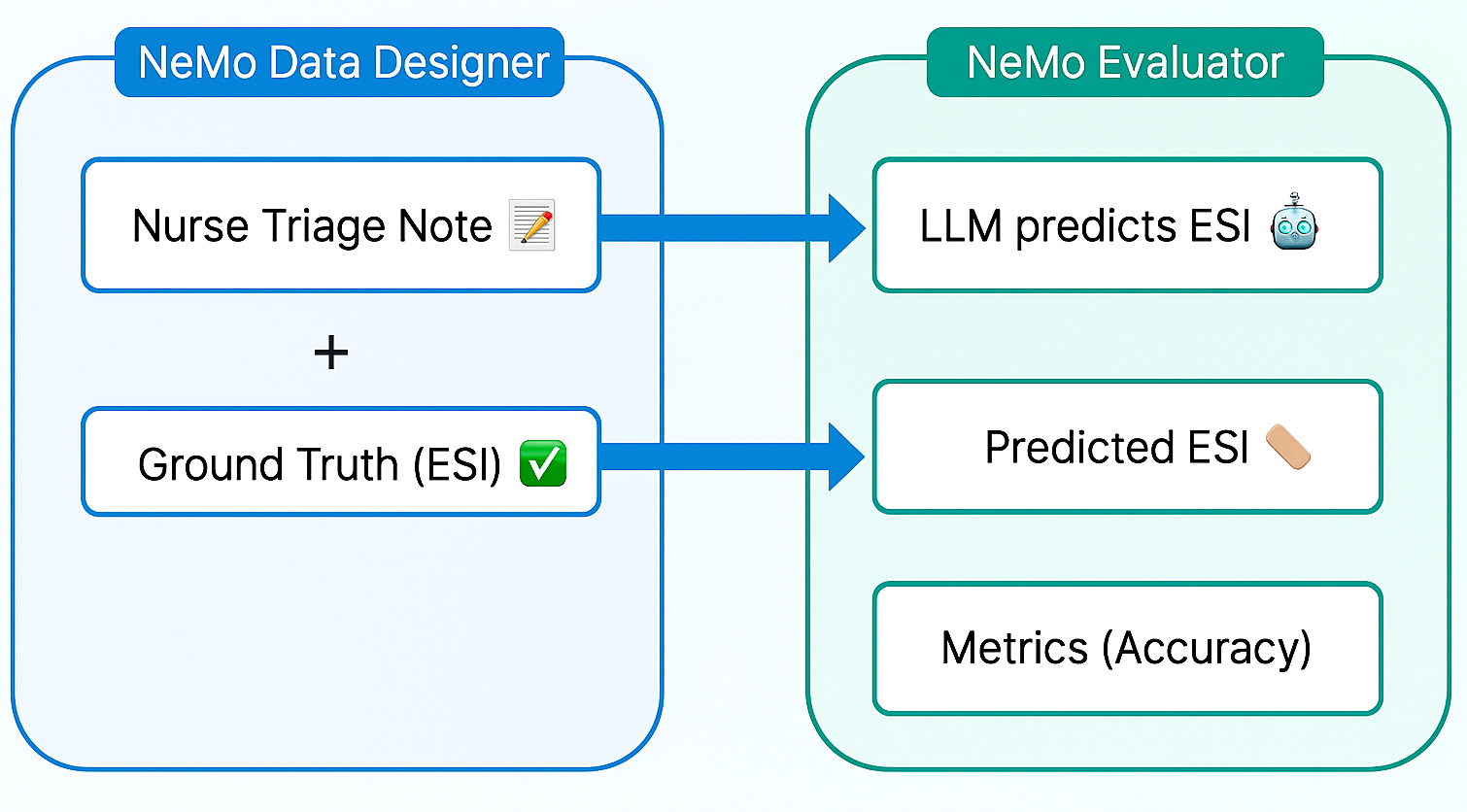
Instead of waiting for real-world notes, we used NeMo Data Designer to create thousands of synthetic nurse triage notes paired with ground-truth ESI labels. To ensure realism, we defined structured prompts and constraints that mimic authentic clinical language and edge cases. Before moving forward, we validated the generated data for consistency in terminology and plausible vitals to avoid introducing bias.
Key features:
- Structured prompts and domain constraints for realism
- LLM-as-a-judge scoring to filter high-quality examples
- Hugging Face-compatible dataset upload for easy integration
First, we initialize the NeMo Data Designer client and model configurations. Here, we establish a connection to the NeMo Data Designer service and define the LLMs that will perform the work. By default, the microservice is configured to use build.nvidia.com as the model provider. This allows you to select from a wide range of NVIDIA Nemotron open models, optimized and packaged as NVIDIA NIM.
from nemo_microservices.data_designer.essentials import *

# 1. Connect to the Client
data_designer_client = NeMoDataDesignerClient(base_url="http://localhost:8080")

# 2. Define Model Configs
# You can find available Model IDs at build.nvidia.com

# Configuration for the 'Writer', e.g. nvidia/nvidia-nemotron-nano-9b-v2
generator_config = ModelConfig(
    provider="nvidiabuild",
    alias="content_generator",
    model="<ENTER_GENERATOR_MODEL_ID>",
    inference_parameters=InferenceParameters(temperature=0.7, max_tokens=8000)
)

# The "Judge" evaluates quality, e.g. openai/gpt-oss-120b
judge_config = ModelConfig(
    provider="nvidiabuild",
    alias="judge",
    model="<ENTER_JUDGE_MODEL_ID>",
    inference_parameters=InferenceParameters(temperature=0.1, max_tokens=4096)
)

# 3. Initialize the Builder
config_builder = DataDesignerConfigBuilder(model_configs=[generator_config, judge_config])
Next, we define the “seed” data that will be used to generate the synthetic triage notes. We use samplers to create random attributes—such as the ESI level, specific clinical scenarios, patient details, and writing style of the note—that will later be injected into the LLM prompt.
config_builder.add_column(
    SamplerColumnConfig(
        name="record_id",
        sampler_type=SamplerType.UUID,
        params={"short_form": True, "uppercase": True}
    )
)

config_builder.add_column(
    SamplerColumnConfig(
        name="esi_level_description",
        sampler_type=SamplerType.CATEGORY,
        params=CategorySamplerParams(values=["ESI 1: Resuscitation", "ESI 2: Emergency", ...),
    )
)

config_builder.add_column(
    SamplerColumnConfig(
        name="clinical_scenario",
        sampler_type=SamplerType.SUBCATEGORY,
        params=SubcategorySamplerParams(
            category="esi_level_description",
            values={
                "ESI 1: Resuscitation": ["Cardiac arrest", "Severe respiratory distress", ...],
                "ESI 2: Emergency": ["Chest pain", "Stroke symptoms", ...],
                # ... define lists for ESI 3, 4, and 5
            },
        ),
    )
)

config_builder.add_column(
    SamplerColumnConfig(
        name="patient",
        sampler_type=SamplerType.PERSON,
        params=PersonSamplerParams(age_range=[18, 70]),
    )
)

config_builder.add_column(
    SamplerColumnConfig(
        name="writing_style",
        sampler_type=SamplerType.CATEGORY,
        params=CategorySamplerParams(values=["Draft", "Adequate", "Polished"]),
    )
)
We use an LLMTextColumn to generate the actual triage note. By using a structured prompt with Jinja templating, we not only inject sampled values (like age and scenario) but also enforce strict formatting constraints (such as “CC:” and “HPI:”). This ensures the model adopts the telegraphic style of a busy nurse rather than writing a generic description.
# Generate the realistic triage note
config_builder.add_column(
    LLMTextColumnConfig(
        name="content",
        model_alias="content_generator",
        prompt=(
            "You are an experienced triage nurse. Write a realistic triage note. "
            "The note is for a {{ patient.age }} y/o {{ patient.sex }}. "
            "Triage classification: '{{ esi_level_description }}'. "
            "Reason for visit: '{{ clinical_scenario }}'. "
            "Desired writing style: '{{ writing_style }}'. "
            "Structure the note with 'CC:' and 'HPI:'. "
            "Respond with ONLY the note text."
        ),
    )
)
To ensure quality, we immediately grade the generated data. We add an LLMJudgeColumn that evaluates the note for “clinical coherence” and “complexity.” This allows us to filter out hallucinations or overly simple examples later.
# Define a rubric for Clinical Coherence
clinical_coherence_rubric = Score(
    name="Clinical Coherence",
    description="Evaluates if clinical details align with the ESI level.",
    options={
        "5": "Perfect alignment; clinically plausible.",
        "1": "Clinically incoherent.",
        # ... intermediate scores
    }
)

# Define a rubric for Complexity
esi_level_complexity_rubric = Score(
    name="ESI Level Complexity",
    description="Evaluates difficulty to infer the ESI level from the note.",
    options={
        "Complex": "Note contains subtle or conflicting information",
        "Moderate": "Note requires some clinical inference",
        "Simple": "Note uses clear indicators that make the ESI level obvious."
    }
)

# Add the Judge Column
config_builder.add_column(
    LLMJudgeColumnConfig(
        name="triage_note_quality",
        model_alias="judge",
        prompt="You are an expert ER physician. Evaluate this triage note...",
        scores=[clinical_coherence_rubric, esi_level_complexity_rubric],
    )
)
Now that our SDG workflow is defined, we run a small preview first to check our synthetically generated data.
# Generate 10 examples to verify configuration
preview = data_designer_client.preview(config_builder, num_records=10)
preview.display_sample_record()
Once satisfied, we can launch the full generation job (e.g., 100 or 1,000 records).
# Submit batch job
job_results = data_designer_client.create(config_builder, num_records=100)
job_results.wait_until_done()
dataset = job_results.load_dataset()
This approach allows developers to scale from hundreds to thousands of labeled examples in minutes—without exposing any real patient data.
Step 2: Evaluate model performance with NVIDIA NeMo Evaluator
Once we have our synthetic dataset, we use NeMo Evaluator to benchmark an LLM’s predictions against the ground truth. NeMo Evaluator provides a unified API that automates running standardized tests and custom benchmarks for speed and reproducibility. For this workflow, apply a custom accuracy metric implemented as a string check to validate whether the model output contains the correct label. We integrate this evaluation into a CI/CD pipeline so every model update triggers automated checks, ensuring continuous validation rather than one-off testing.
Before running the evaluation, we need to upload our filtered synthetic dataset to a datastore (like Hugging Face) that the Evaluator service can access. We separate the data by complexity level to see how models perform on harder tasks.
from huggingface_hub import HfApi

# ... filtering logic to separate dataset by complexity (Simple, Moderate, Complex) ...

# Loop through complexity levels and upload to Hugging Face
for level, df in df_complexities.items():
    repo_id = f"triage-eval/nurse-triage-notes-{level}"
    file_name = f"dataset_{level}.jsonl"

    # Save to JSONL and upload
    df.to_json(file_name, orient="records", lines=True)

    hf_api.upload_file(
        path_or_fileobj=file_name,
        path_in_repo=file_name,
        repo_id=repo_id,
        repo_type="dataset",
        # ...
    )

    print(f"Uploaded dataset for complexity: {level}")
We define a configuration object that tells the Evaluator what to do. Here, we specify a custom evaluation type using a completion task. We provide a prompt template that asks the model to act as an expert nurse and output only the ESI level.
Crucially, we define the metric as a string-check. This checks if the model’s output contains the correct ground-truth label (e.g., “ESI 2: Emergency”).
EVALUATOR_CONFIG = {
    "eval_config": {
        "type": "custom",
        "tasks": {
            "triage_classification": {
                "type": "completion",
                "params": {
                    "template": {
                        "messages": [
                            {"role": "system", "content": "You are an expert ER triage nurse..."},
                            {"role": "user", "content": "Triage Note: {{item.content}}..."}
                        ],
                    }
                },
                # Define success metric: Does the output contain the ground truth?
                "metrics": {
                    "accuracy": {
                        "type": "string-check",
                        "params": {
                            "check": ["{{sample.output_text}}", "contains", "{{item.esi_level_description}}"]
                        }
                    }
                },
                "dataset": { "files_url": None } # Placeholder, filled dynamically later
            }
        }
    },
    # ... target_config for the model endpoint
}
Finally, we iterate through our different models (e.g., Qwen and NVIDIA Nemotron) and our different complexity datasets. We submit a job for every combination to the NeMo Evaluator client and print the accuracy scores.
MODEL_SPECS = [
    {"name": "Qwen3-8B", "model_id": "Qwen/Qwen3-8B", ...},
    {"name": "Nemotron Nano 9B", "model_id": "nvidia/nvidia-nemotron-nano-9b-v2", ...}
]

# Run evaluation for every model on every complexity level
for complexity in ["simple", "moderate", "complex"]:
    for spec in MODEL_SPECS:

        # 1. Update config with specific model and dataset URL
        config = copy.deepcopy(EVALUATOR_CONFIG)
        config['eval_config']['tasks']['triage_classification']['dataset']['files_url'] = files_url_dict[complexity]
        config['target_config']['model']['api_endpoint']['url'] = spec['url']

        # 2. Submit Job
        job = client.evaluation.jobs.create(
            target=config['target_config'],
            config=config['eval_config']
        )

        # 3. Wait for results
        results = client.evaluation.jobs.results(job.id)
        accuracy = results.tasks['triage_classification'].metrics['accuracy'].value

        print(f"Model: {spec['name']} | Complexity: {complexity} | Accuracy: {accuracy:.2%}")
By structuring the evaluation this way, we move beyond a single, aggregate accuracy score and gain granular insights into model behavior. We can now pinpoint exactly where a model struggles—perhaps it handles “simple” triage notes perfectly but hallucinates details in “complex” scenarios.
This automated loop transforms evaluation from a manual, one-off event into a continuous validation engine. Whether you are swapping out model architectures or tweaking prompt templates, this pipeline ensures that every change is rigorously benchmarked against ground-truth data, providing the confidence needed to deploy clinical AI agents into production.
Takeaways
Data scarcity and privacy regulations no longer have to be a bottleneck for innovation. As we demonstrated, you can now build robust, domain-specific evaluation benchmarks without ever exposing a single real patient or customer record.
By combining NeMo Data Designer for generation and NVIDIA NeMo Evaluator for validation, you can turn the slow, manual process of model benchmarking into a rapid, automated workflow. Get started with the notebook on GitHub.
Ready to dive deeper?
- Explore NeMo Data Designer using the NeMo Microservices Platform or the open source NeMo Data Designer library to generate realistic synthetic datasets tailored to your domain.
- Try out the NeMo Evaluator microservice for automating your evaluation pipeline. Check out the demo for a step-by-step on how to use it. NeMo Evaluator is also available as an open-source toolkit on GitHub.
- Experiment with open NVIDIA Nemotron models on Hugging Face, or as NIM APIs from NVIDIA Build, for fine-tuning and advanced domain-specific reasoning.
Stay up-to-date on NVIDIA Nemotron by subscribing to NVIDIA news and following NVIDIA AI on LinkedIn, X, Discord, and YouTube. And visit our Nemotron developer page for all the essentials you need to get started with the most open, smartest-per-compute reasoning model.