Port Your Windows Application to RTX Spark
Introducing the NVIDIA RTX Spark™ Superchip. The fusion of NVIDIA AI and RTX graphics in a single chip redefines Windows PCs and delivers amazing creating, AI development, and gaming. Port your app to this new Windows on Arm platform now to deliver a fast, reliable native experience your users expect and join the 100+ software providers already embracing the platform.
Windows on Arm Resources
What is Windows on Arm?
Windows on Arm is a version of the Windows operating system that offers high-performance and energy efficient computing on NVIDIA RTX Spark PCs.
Windows on Arm Developer Overview
Explore tools and guidance to build, port, test, and optimize Windows apps for native Arm64 performance on NVIDIA RTX Spark PCs.
Windows on Arm FAQs
Find answers to common questions about Windows on Arm PCs, including app compatibility, performance, and device support.
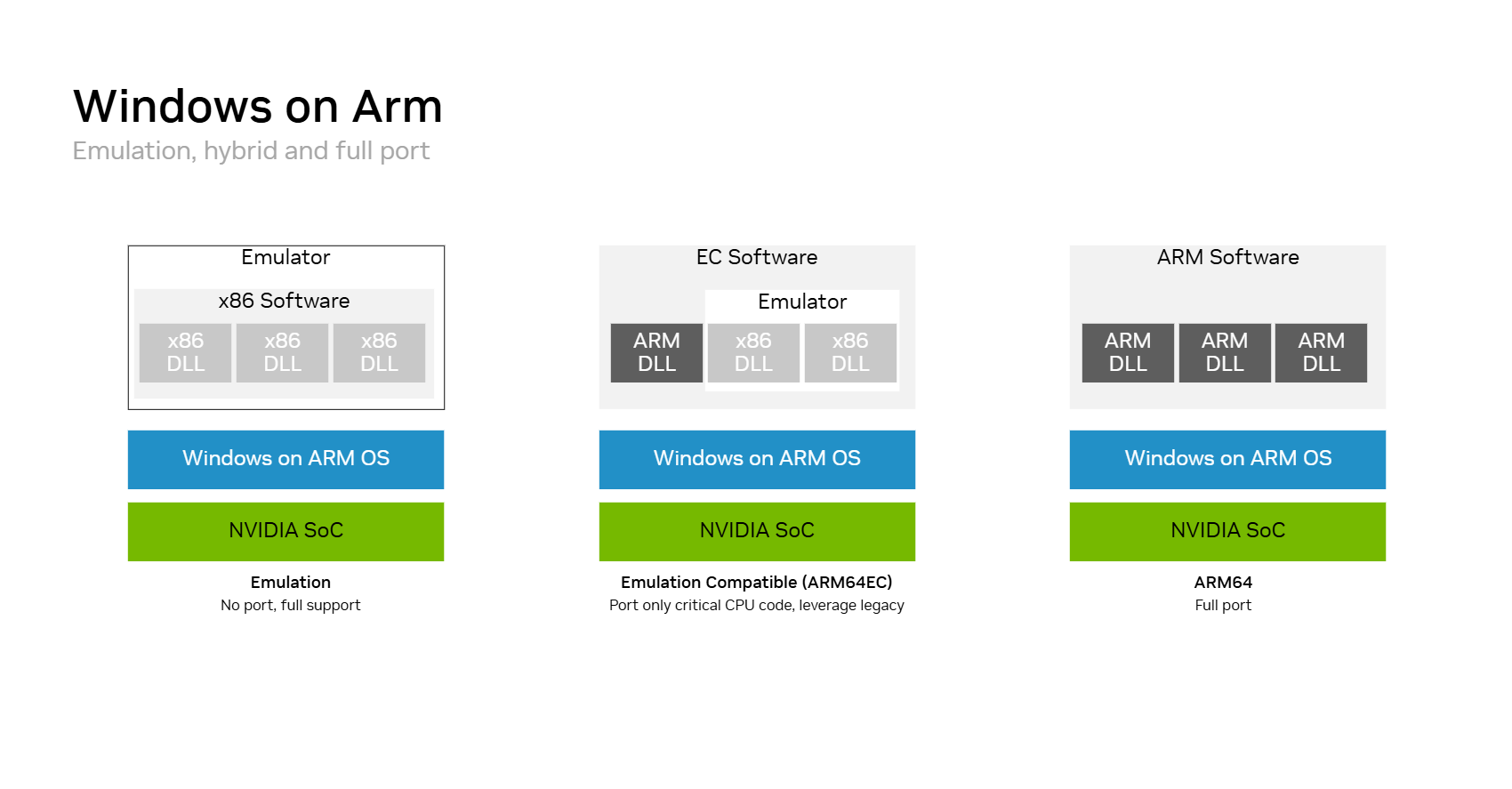
Windows on Arm Migration Options
Windows on Arm offers three deployment paths:
Full ARM64: Deliver fully native execution with the greatest engineering effort.
Emulation: Run existing x86 software without modification.
Arm64EC ABI: Port performance-critical code while retaining legacy x86 dependencies.
Start with emulation, then port components where performance or platform requirements justify it.
Steps to Port Your Application to Arm for Optimal Performance
You can begin porting your application before RTX Spark hardware is available. Use an existing Windows on Arm development system to identify incompatible dependencies and produce a Arm64 build.
Review your application and dependencies for Arm64 support.
Choose an Arm64 or Arm64EC ABI porting strategy appropriate for your application.
Build and test your application on Windows on Arm.
Validate the NVIDIA and CUDA software paths used by your application.
Test installation, updates, functionality, and performance.
Validate on RTX Spark once supported hardware and software become available.
Get Started Porting Your Application
Access the following resources to port your application
NVIDIA x64 Driver for Cross Compilation
Developer driver to cross-compile for Windows on Arm devices.
CUDA Toolkit 13.4
CUDA Toolkit 13.4 enables native Windows on Arm development and cross-compilation from the Windows x86_64 toolkit.
Nsight Tools
NVIDIA Nsight Graphics and NVIDIA Nsight Aftermath SDK support graphics debugging, profiling, and GPU-crash diagnostics.
TensorRT for RTX
TensorRT for RTX brings optimized AI inference and cutting-edge acceleration to developers using NVIDIA RTX GPUs.
Ollama on Windows on Arm
Ollama is an easy-to-use LLM inference tool that runs models based on the llama.cpp engine.
PyTorch on Windows on Arm
PyTorch is a foundational framework for AI that is built for diffusion, fine-tuning and experimentation.
Download using:
python -m pip install --pre --upgrade --only-binary=:all: --extra-index-url 'https://pypi.nvidia.com/nvtorch_oot_nightly' torch torchvision torchaudio
Llama.cpp on Windows on Arm
Llama.cpp is an light-weight C/C++ framework for LLM inferencing.
More Resources


Ethical AI
NVIDIA believes Trustworthy AI is a shared responsibility and we have established policies and practices to enable development for a wide array of AI applications. When downloaded or used in accordance with our terms of service, developers should work with their supporting model team to ensure this model meets requirements for the relevant industry and use case and addresses unforeseen product misuse.
For more detailed information on ethical considerations for this model, please see the Model Card++ Explainability, Bias, Safety & Security, and Privacy Subcards. Please report security vulnerabilities or NVIDIA AI Concerns here.
Porting an app, game, AI tool, or creator workflow to RTX Spark?
Tell us about your project.