NVIDIA nvmath-python
nvmath-python is an open source Python library that provides native NVIDIA CUDA-X™ math library performance through high-level, reimagined Python APIs. It supports JIT compilation, kernel fusion, and multi-GPU distributed execution for linear algebra, FFT, and sparse operations — without requiring C++ or manual CUDA management. Compatible with NumPy, CuPy, and PyTorch.
NVIDIA nvmath-python is designed to seamlessly enhance and complement the existing scientific Python ecosystem, it eliminates the performance compromises found in standard array libraries.
Whether you’re a data practitioner, an open source library developer, or a specialist writing extreme-performance GPU kernels, nvmath-python provides the transparency and architectural access you need.
How does nvmath-python deliver GPU accelerated performance in Python?
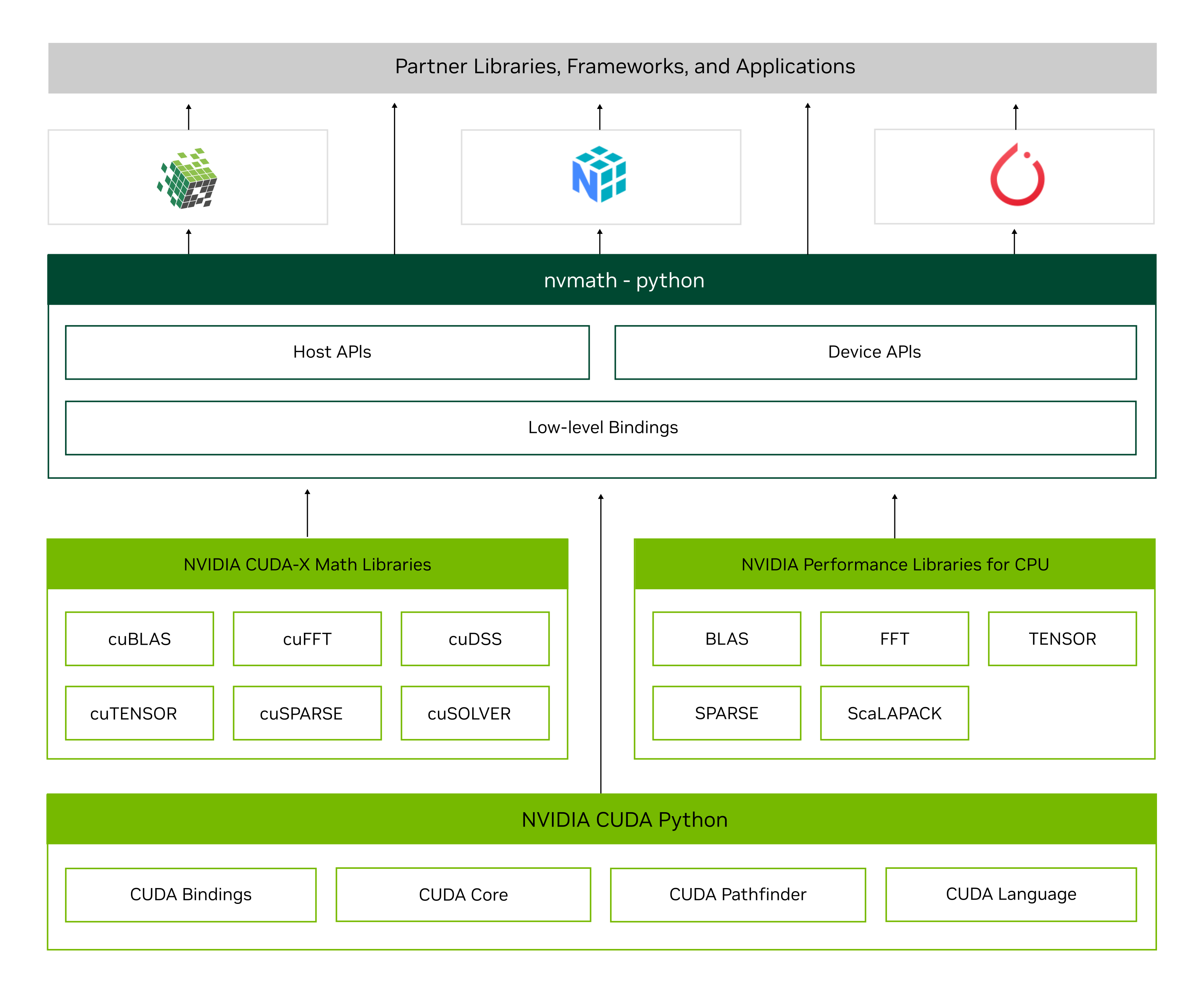
nvmath-python bridges the gap between scientific Python ecosystems and low-level hardware acceleration by seamlessly routing standard mathematical expressions directly to high-performance NVIDIA CUDA-X libraries. The workflow begins when high-level data arrays from frameworks like NumPy, CuPy, or PyTorch are passed into nvmath-python’s stateful or stateless APIs. From there, the library’s internal Just-In-Time (JIT) machinery kicks in for the compilation of the Python code and/or for a kernel fusion to bring the performance efficiency to new heights.
When single-GPU limits are reached, the library offers a seamless transition to multiple GPUs by offering distributed APIs that allow scaling your math library operations to thousands of GPUs, thanks to the underlying libraries like cuBLASMp, cuSOLVERMp, and cuFFTMp and backends like NCCL and NVSHMEM.
GitHub
Explore the open source repository for nvmath-python. Access the source code, report issues, and view real-world implementation examples that bridge Python with NVIDIA CUDA-X math libraries.
Notebooks
Get hands-on with a collection of interactive Jupyter notebooks. These practical examples cover everything from basic host APIs to advanced multi-GPU distributed linear algebra and custom device kernels.
Tutorials
A comprehensive guide demonstrating how to use stateful execution planning, advanced kernel fusion callbacks, and distributed process groups to scale workloads seamlessly across multiple GPUs and nodes.
Key Features
Accelerate workloads with high-level APIs, seamless scaling, and zero ecosystem friction.
Intuitive Pythonic APIs
nvmath-python APIs cover sophisticated use cases that allow planning, autotuning, and JIT-compilation/ kernel fusions, which are impossible with standard NumPy-like libraries without performance compromises. And this architectural sophistication doesn’t come at the expense of simplicity; everything is as simple as NumPy.
Scalable Performance
Push execution limits close to underlying native CUDA-X libraries. Bypass the limitations of a single device with distributed entry points that seamlessly scale out to multi-GPU arrays and clustered nodes using NCCL backends. You can scale your linear algebra and FFT workloads across massive data grids without a major code rewrite.
Interoperability
Accelerate math operations without replacing your favorite array libraries. nvmath-python works as a drop-in companion to NumPy, CuPy, and PyTorch, supporting effortless transition between CPU and GPU memory spaces. Keep your familiar workflows, data structures, and indexing patterns intact while offloading heavy numerical math to native hardware.
Supported Operations
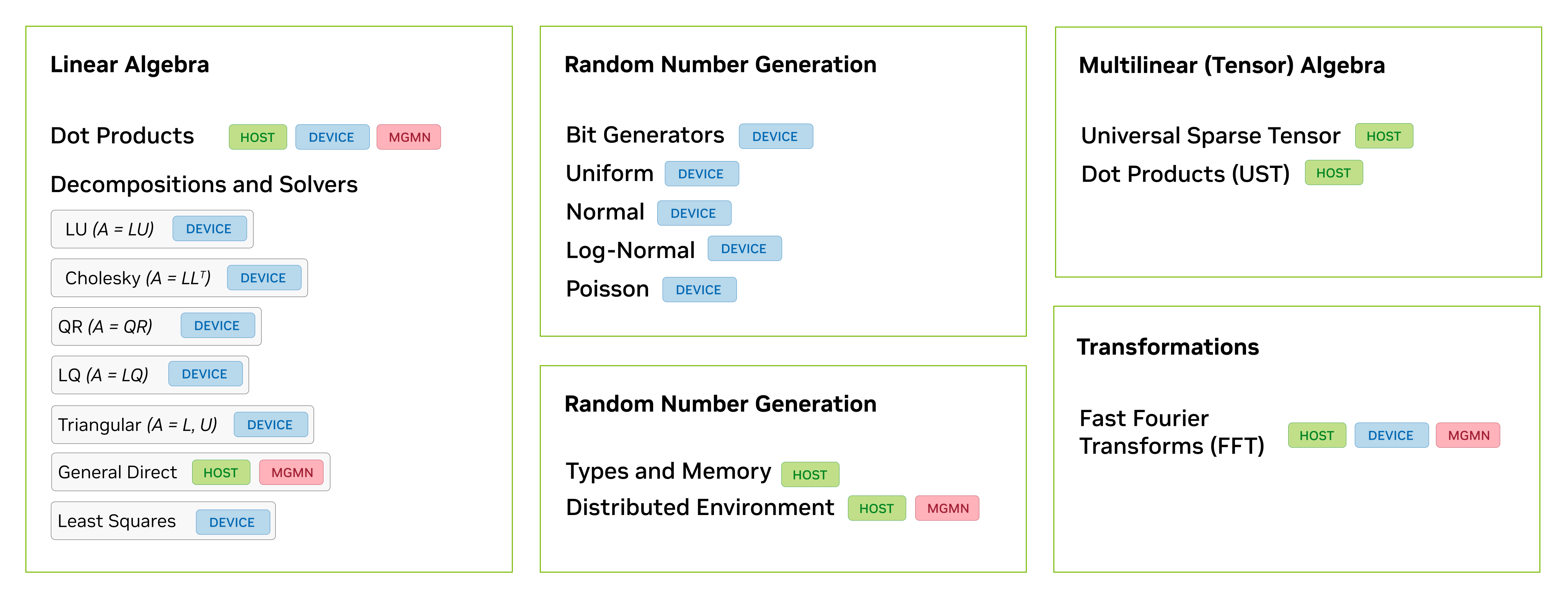
Explore the hierarchy of mathematical operations supported by nvmath-python.
Performance
nvmath-python bridges the gap between high-level Python and bare-metal performance. By leveraging automatic JIT compilation, dynamic kernel fusion, and execution planning amortization, it eliminates standard framework overheads to unlock native NVIDIA CUDA-X execution speeds.
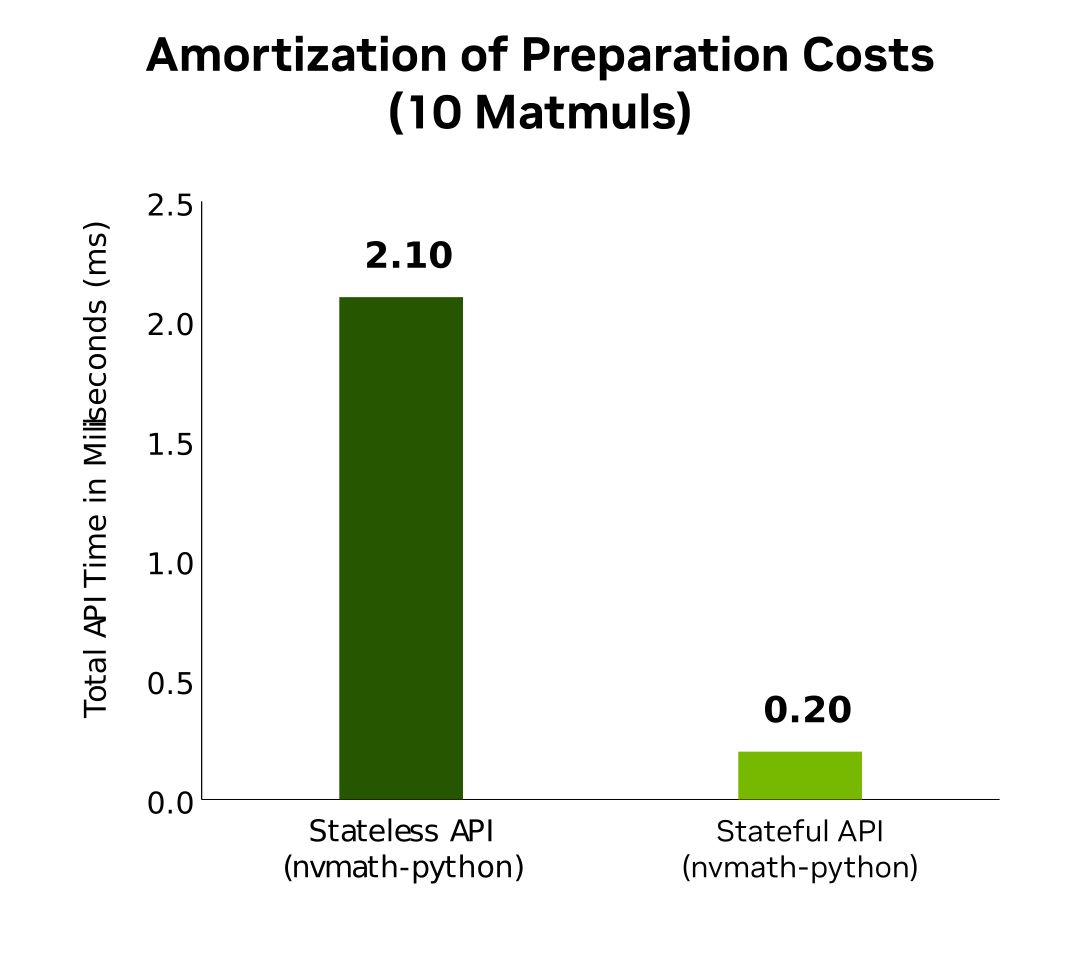
API Preparation Costs Amortization (10 Matmuls)
This chart measures the total API overhead time in milliseconds (lower is better) to execute a sequence of 10 matrix multiplications, demonstrating how transitioning to a stateful class-form layout dramatically eliminates repeated execution planning overhead.
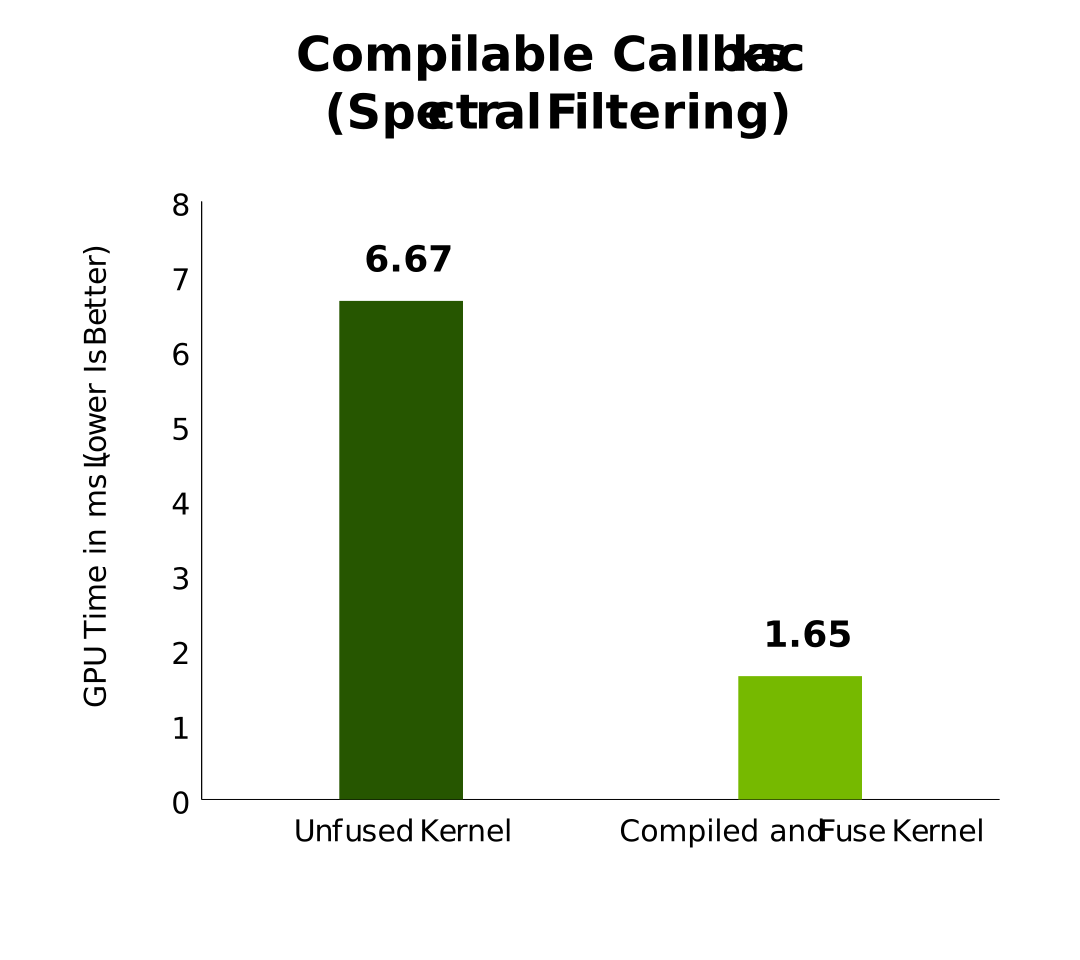
Compilable Callbacks (Spectral Filtering)
This chart contrasts the total GPU execution time in milliseconds (lower is better) between an unfused signal processing routine and an optimized routine that compiles custom filtering code straight into a native cuFFT execution stream via JIT-compiled callbacks.
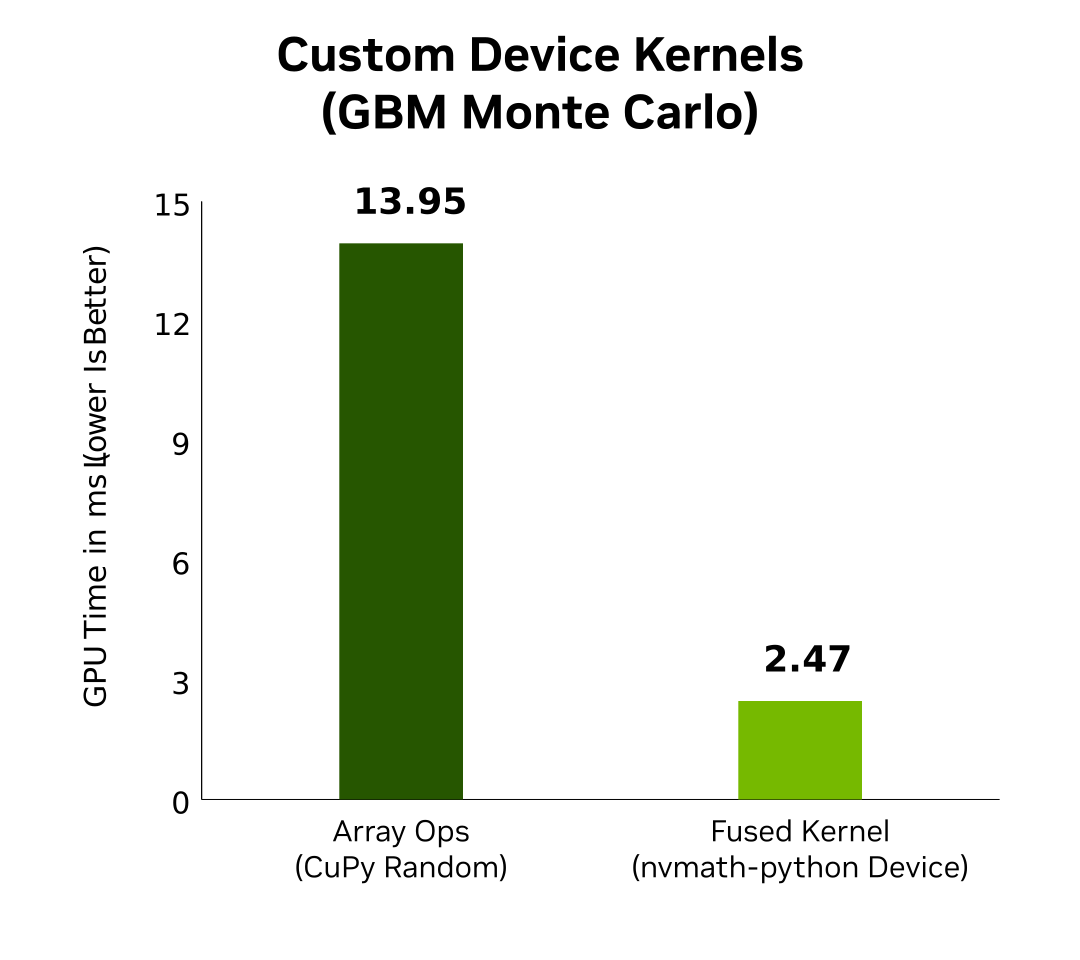
Custom Device Kernels (GBM Monte Carlo)
This chart highlights GPU time in milliseconds (lower is better) for a continuous simulation workflow, showing how nesting raw cuRAND primitives directly within custom Numba CUDA device kernels bypasses the performance-crippling host synchronization penalties of basic array operations.
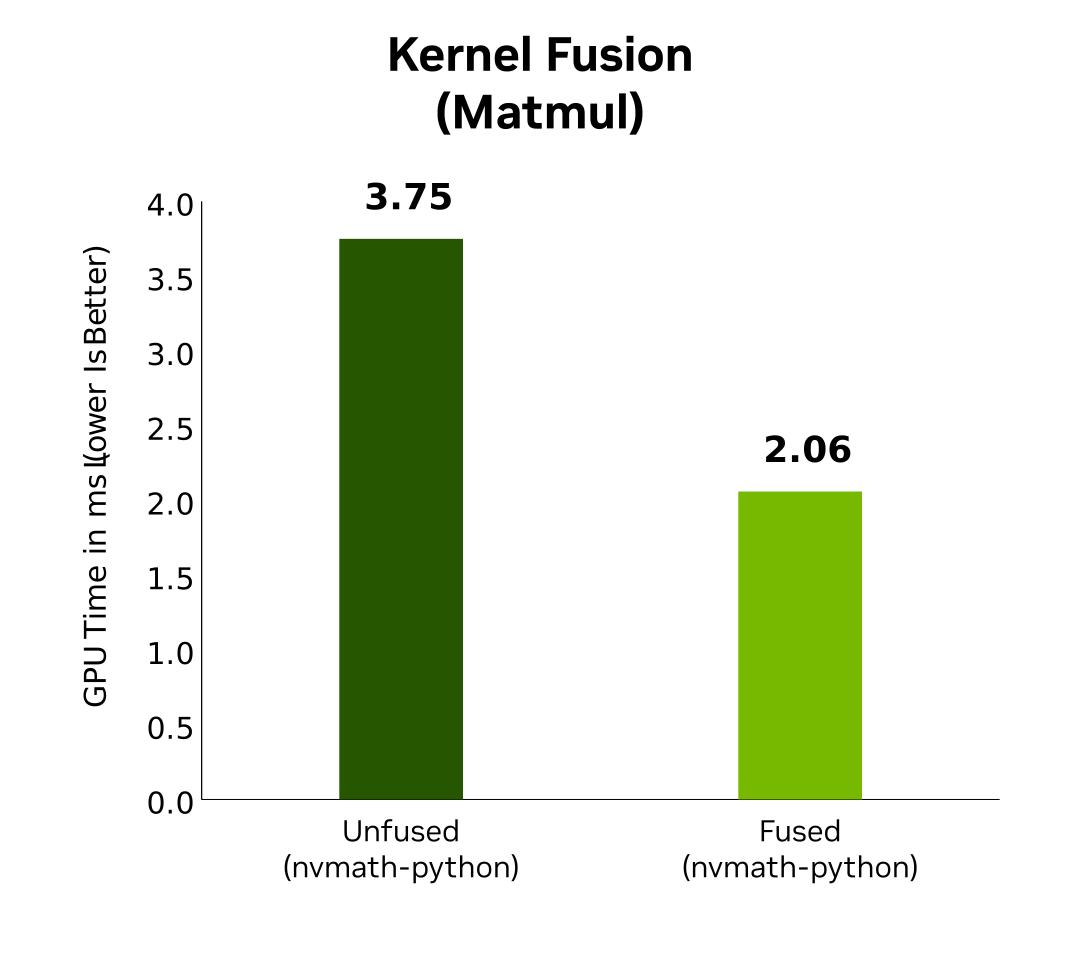
Kernel Fusion (Matmul)
This chart tracks GPU computation time in milliseconds (lower is better) to show the performance leap achieved when separate primitive operations are dynamically fused straight into a single, unified compute kernel at runtime.
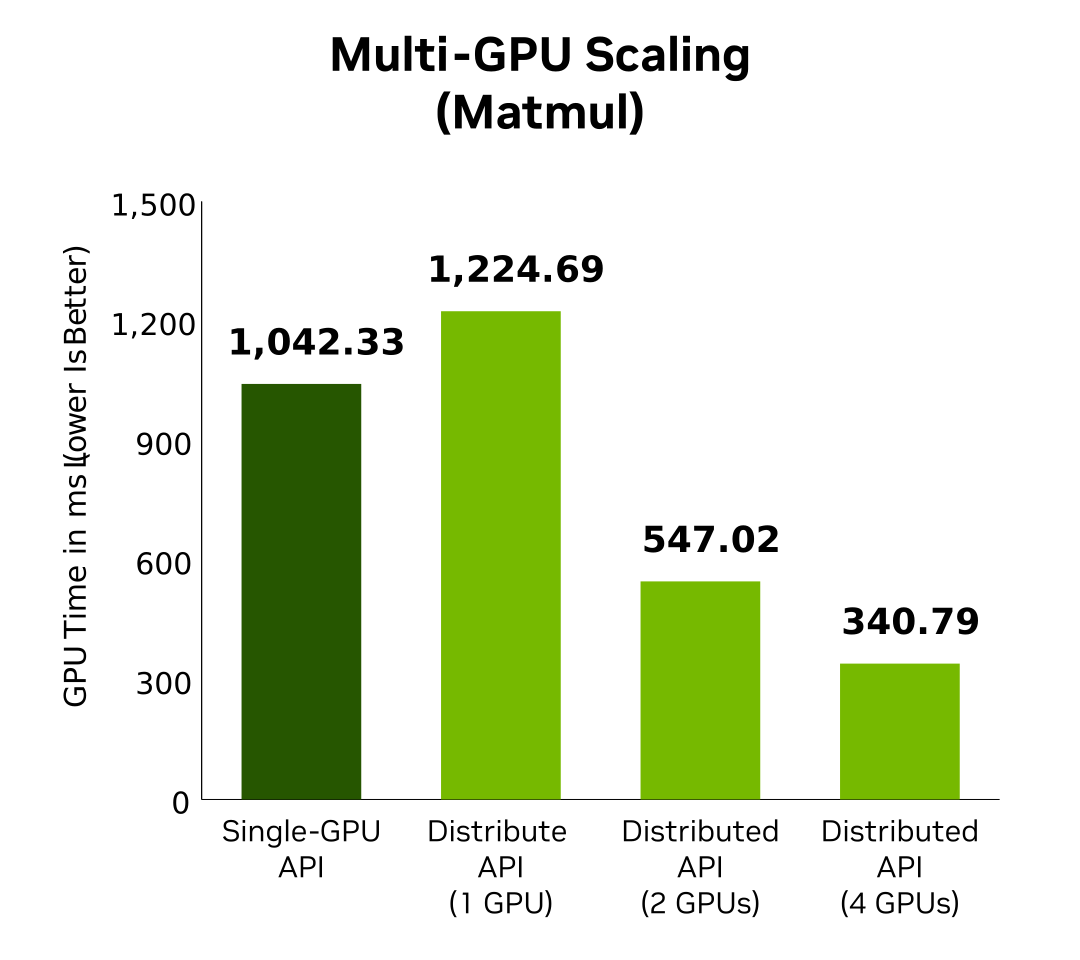
Multi-GPU Scaling (Matmul)
This chart measures total GPU execution latency in milliseconds (lower is better) across expanding hardware topologies, illustrating how distributed process groups seamlessly scale computing throughput as workload demands outgrow a single device.
Starter Kits
These curated resource bundles provide structural paths to help you conquer common bottlenecks—whether you’re maximizing arithmetic intensity on a single GPU or distributing complex linear algebra operations across a cluster.
The Performance Optimization and Kernel Fusion Bundle
Accelerate your single-GPU workloads by learning how to eliminate memory bandwidth bottlenecks and bypass standard array library limitations.
Watch Performance Optimization Video (01:23:41)
The Multi-GPU Distributed Scaling Blueprint
Transition seamlessly from single-device execution to multi-node configurations without altering your core numerical expressions.
Learning Library
nvmath-python Documentation, Tutorials, and Code Examples
nvmath-python FAQ
Get answers to common questions about NVIDIA® nvmath-python ®, including supported platforms, features, and applications.
nvmath-python is an open source library that provides high-level, Pythonic APIs to access NVIDIA’s high-performance CUDA-X math libraries. It allows developers to achieve near-native hardware acceleration while maintaining the simplicity of the standard scientific Python ecosystem, effectively eliminating performance bottlenecks found in conventional array libraries.
Learn how nvmath-python unlocks native performance for Python-based mathematical workloads.
While standard libraries often suffer from performance overhead due to high-level abstractions, nvmath-python utilizes a Just-In-Time (JIT) machinery and kernel fusion to bridge the gap between high-level Python code and low-level hardware execution. It is designed to work as a drop-in companion rather than a replacement, allowing you to offload heavy numerical computations to native NVIDIA hardware. It is designed for interoperability and works as a companion to libraries like NumPy, CuPy, and PyTorch. It supports seamless transitions between CPU and GPU memory spaces, allowing you to keep your existing data structures and workflows intact.
See examples of matrix multiplication using CuPy arrays with the generic API.
To use nvmath-python, you should be familiar with the scientific Python ecosystem (NumPy/CuPy/PyTorch) and have access to an NVIDIA GPU. Understanding the basics of CUDA or HPC concepts can help you take full advantage of the library's performance-tuning features.
Browse the Accelerated Computing Hub for structured learning paths.
Yes, nvmath-python allows for advanced customization, including custom device kernels and JIT-compiled callbacks. This provides the flexibility to implement unique mathematical routines that run at hardware-native speeds.
Learn about implementing custom filtering code using JIT-compiled callbacks.
nvmath-python includes support for sparse structures, such as the Universal Sparse Tensor (UST). This allows developers to accelerate sparse scientific and deep learning applications, simplifying the complexities traditionally associated with sparse tensor operations.
Read more about simplifying sparse deep learning on the NVIDIA Technical Blog.
You can begin by installing the package from the NVIDIA documentation site. The site provides a comprehensive installation guide, quickstart tutorials, and links to open-source repositories to help you integrate nvmath-python into your existing workflows.
Follow the Installation Guide to set up your environment.
Yes, a collection of interactive Jupyter notebooks is available in the official GitHub repository. These notebooks cover a wide range of use cases, from basic host APIs to advanced multi-GPU distributed linear algebra and custom device kernels.
Get hands-on with the nvmath-python Jupyter Notebooks.
You can join the NVIDIA Developer Forums to discuss nvmath-python, report issues, and share experiences with other developers and NVIDIA experts.
Visit the nvmath-python Developer Forum to engage with the community.
While specific metrics vary by workload, the library enables significant performance leaps by eliminating host synchronization penalties and streamlining kernel execution. You can use the provided examples to benchmark your own workloads.
Watch this deep dive session on NVIDIA Math Libraries to see performance optimization strategies in action.
nvmath-python is an open source library, and contributions are encouraged. You can report bugs, request features, or submit pull requests directly to the repository on GitHub.
Start by checking the nvmath-python issue tracker on GitHub.
More Resources


Get started with nvmath-python