Building a Simple EGLStream Pipeline
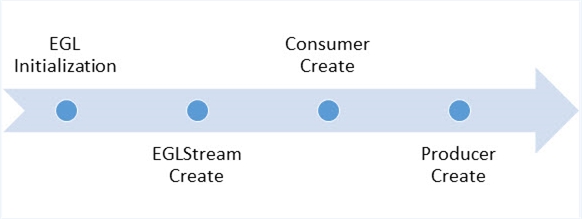
Before you build a simple EGLStream pipeline, you must initialize the EGL interface on the platform and create the EGLDisplay.
- Create the
EGLDisplayobject for the EGLStream to bind to it.The following window interfaces are supported in the application:
- X11 (Linux only)
- EGL device
There is a separate implementation for each window system. For code details, see the following dictionary:
<top>/drive-linux/samples/nvmedia/eglstream/winintf/ - Call
eglInitialize()to initialize EGL on the created display or on the default display.If the GL consumer or EGL output consumer is used, you must initialize the rendering window before creating the EGL pipeline.
If the NvMedia/CUDA producer-consumer is used, window system initialization is not required. In the absence of available display devices, EGL can be initialized using the default display. Instead of rendering output, EGL can write an encoded (H.264) output file for NvMedia consumer.
There is a separate implementation of
WindowSystemInit()for each window system. For more information, see the EGL initialization implementations in thewinintfdirectory. - Create an EGLStream.
The following example of creating an EGLStream is from
eglstrm_setup.c:// Standalone consumer or no standalone mode eglStream = eglCreateStreamKHR(display, args->fifoMode ? streamAttrFIFOMode : streamAttrMailboxMode); if (eglStream == EGL_NO_STREAM_KHR) { LOG_ERR("EGLStreamInit: Couldn't create eglStream.\n"); return 0; }Depending on whether mailbox mode or FIFO mode is used, the EGLStream sample sets the
attrib_listto one of the arrays shown in the following example.static const EGLint streamAttrMailboxMode[] = { EGL_METADATA0_SIZE_NV, 16*1024, EGL_METADATA1_SIZE_NV, 16*1024, EGL_METADATA2_SIZE_NV, 16*1024, EGL_METADATA3_SIZE_NV, 16*1024, EGL_NONE }; static const EGLint streamAttrFIFOMode[] = { EGL_STREAM_FIFO_LENGTH_KHR, 4, EGL_METADATA0_SIZE_NV, 16*1024, EGL_METADATA1_SIZE_NV, 16*1024, EGL_METADATA2_SIZE_NV, 16*1024, EGL_METADATA3_SIZE_NV, 16*1024, EGL_NONE }; - Create a consumer and connect it to the EGLStream.
The EGLStream sample application defines the following consumer creation functions:
cuda_consumer_init();    // Initializes a CUDA consumer.
glConsumer_init();       // Initializes a GL consumer.
Each consumer creation function starts a process thread for
procThreadFunc().procThreadFunc(), which is specific to the consumer, acquires and processes EGL frames. The following example is fromcuda_consumer.c:pthread_create(&cudaConsumer->procThread, NULL, procThreadFunc, (void *)cudaConsumer); if (!cudaConsumer->procThread) { LOG_ERR("Cuda consumer init: Unable to create process thread\n"); cudaConsumer->procThreadExited = NV_TRUE; return NV_FALSE; }Once an EGLStream is connected to a consumer, it remains connected to the same consumer until the EGLStream is destroyed.
- Create a producer and connect it to the EGLStream.
The EGLStream sample application defines the following producer creation functions:
VideoDecoderInit();  // Initializes an NvMedia video producer.
Image2DInit();       // Initializes an NvMedia image producer.
CudaProducerInit();  // Initializes a CUDA producer.
GearProducerInit();  // Initializes a GL producer.
Once an EGLStream is connected to a producer, it must remain connected to the same producer until the EGLStream is destroyed.
The initialization function also starts a process thread for generating and posting EGL frames.