Accelerate AI on Local NVIDIA GPUs
Accelerate AI for maximum throughput and lowest latency across major AI inference backends and the full range of NVIDIA GPUs—from NVIDIA RTX™ laptops, desktops, and workstations to NVIDIA RTX Spark™, NVIDIA DGX Spark™ and DGX Station™ AI supercomputers.
Overview of AI Inference Backends
Developers need to consider several factors before choosing a deployment path for their application. Each inference path offers specific model optimization tools and deployment mechanisms.
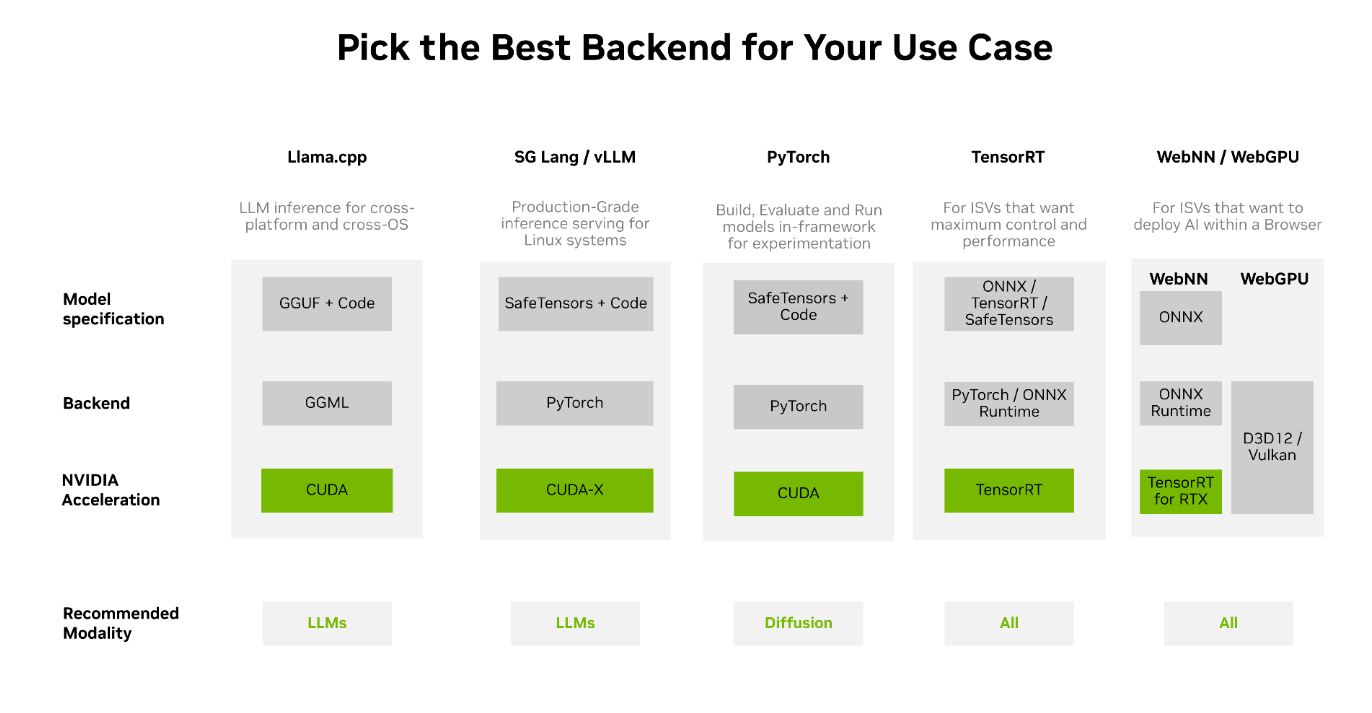
Choosing an Inferencing Backend for Your Local AI Use Case
To choose the right inference backend:
Determine the hardware you want the AI to run on.
Determine the model types you want the hardware to run.
Finalize how you will call into the model: in-process, through a local API, or through a multi-user server.
Compare model type and format, operating system, supported NVIDIA GPU architecture, memory requirements, integration API, concurrency, and optimization path.
Llama.cpp |
SG Lang / vLLM |
PyTorch |
TensorRT |
WebNN / WebGPU |
|
|---|---|---|---|---|---|
Best for |
Developers who want a simple local model service or a lightweight C/C++ runtime across operating systems and hardware |
Production-grade inference serving on NVIDIA GPUs |
Model development, evaluation, and in-process inference |
Developers who optimize and deploy AI models with maximum control and best performance on NVIDIA GPUs |
Developers who want to deploy AI inference within web-based browsers |
| Integration Mode | Local server or embedded runtime |
Local server |
In-process library |
Compiled runtime or optimized server |
In-Browswer |
| OS Support | All |
Linux |
Windows and Linux |
Windows and Linux |
All |
Hardware Support |
Any GPU, NPU, or CPU |
Any GPU |
Any GPU or CPU |
Any NVIDIA GPU |
Any GPU or CPU |
Model Checkpoint Format |
GGUF or GGML |
Safetensors or PyTorch |
PyTorch |
ONNX, NVIDIA TensorRT™, Torch |
ONNX, WGSL |
Usage via |
Single binary install |
Docker or Python package |
Installation of Python dependencies required |
Install SDK and Python bindings |
Javascript / Rust browser libraries or directly |
LLM Support |
 |
|
|
|
|
Diffusion Support |
- |
Supported via external packages |
|
|
|
CNN Support |
- |
|
|
|
|
| Model Optimizations | Llama.cpp / Unsloth |
Various |
Model Optimizer |
Model Optimizer |
- |
Python |
|
|
|
|
|
C/C++ |
|
- |
|
|
|
Who Are WebNN and WebGPU for?
Developers who want to deploy AI inference within web-based browsers.
Inferencing Backends
There are two ecosystems to deploy AI within a browser. The first is WebNN, which is built using the TensorRT and ONNX-Runtime ecosystem. The second is WebGPU, which is built using the Direct3D 11 programming interface. Both these libraries are supported and accelerated on NVIDIA GPUs.
Developers can either utilize WebNN or WebGPU directly or via abstracted libraries, such as ONXX-Runtime-Web, and Transformer.js.
Who Is Llama.cpp for?
Developers who want a simple local model service or a lightweight runtime across operating systems and hardware.
Inferencing Backends
Ollama, Llama.cpp, and LM Studio are separate projects with different interfaces. Ollama manages models and exposes a local HTTP API. Llama.cpp is a lightweight C/C++ runtime with bindings and an optional OpenAI-compatible server. Both support GGUF models; supported tasks and GPU acceleration depend on the model, build, and release.
Model Optimization
Use Llama.cpp tools or compatible training and conversion workflows to create quantized GGUF models. Lower-bit quantization can reduce memory and compute requirements, with an accuracy and quality tradeoff that varies by model and workload.
Who is TensorRT for?
Developers optimizing and deploying AI models with maximum control and best performance on NVIDIA GPUs.
Inferencing Backends
NVIDIA TensorRT™ is an ecosystem of tools for developers to achieve high-performance deep learning inference on NVIDIA GPUs. TensorRT includes inference compilers, runtimes, and model optimizations that deliver low latency and high throughput for production applications. The TensorRT ecosystem includes the TensorRT compiler and runtime, TensorRT-LLM, and TensorRT for RTX.
Developers can use TensorRT directly. For simpler and higher-level abstracted APIs, developers can use ONNX-Runtime for cross-platform deployment and WindowsML for cross-vendor apps across the Windows OS.
Model Optimization
Use NVIDIA Model Optimizer to prepare supported models with quantization, sparsity, distillation, and export workflows. Validate target GPU compatibility and supported operators against the specific TensorRT product and release.
Get Started With NVIDIA Model OptimizerWho Is PyTorch for?
Developers building, evaluating, and running models in the same Python-centered workflow used for training and experimentation.
Inferencing Backends
PyTorch is a popular open-source machine learning library that offers cross-platform and cross-device inference. It works with safetensors and PyTorch checkpoints.
Hugging Face Transformers and Diffusers provide model and pipeline integrations for easier getting-started options.
Get Started With Hugging Face Diffusers
Model Optimization
Use torchao for PyTorch-native quantization and sparsity workflows or NVIDIA Model Optimizer for post-training quantization, quantization-aware training, sparsity, distillation, and export paths supported by downstream NVIDIA runtimes. In addition, developers can use Torch-TensorRT for RTX, which offers a path to directly use torch models for accelerated AI on RTX systems.
Get Started With Model OptimizerWho Are SG Lang and vLLM for?
Developers who want production-grade and concurrent inference serving on NVIDIA GPUs.
Inferencing Backends
vLLM and SG Lang are production-grade inference serving engines for serving multiple users at high concurrency. They offer support for the latest models and have advanced techniques for high throughput and efficient inferencing across modalities. They are both PyTorch-based backends and can work with the latest models. Use them by installing a Python package or using a supported Docker container, then expose an OpenAI-compatible API on the local network. These frameworks are Linux-first.
Model Optimization
Use framework-supported quantized formats and caching features to reduce memory use or improve throughput. NVIDIA Model Optimizer can prepare supported model checkpoints for selected downstream runtimes. Available techniques vary by model and release.
Stay up to date on how to power your AI apps with NVIDIA RTX PCs.