

Considerations for Inter-VM#
Inter-VM communication introduces important considerations for application developers working with NvSci libraries. The NvSci framework is designed to enable efficient, zero-copy data sharing through NvSciBuf objects, which can be shared across virtual machine boundaries. However, this approach presents unique challenges when dealing with VM lifecycle events, particularly when a VM that allocated shared memory resources undergoes an unexpected restart or termination. In such scenarios, the shared memory objects become invalid, potentially leaving applications in other VMs with stale references that can no longer be used safely.
Understanding how NvSci behaves during VM restart scenarios is essential for building robust inter-VM applications. This section explains the key constraints, detection mechanisms, and recovery strategies that application developers need to implement to handle VM lifecycle events gracefully. The guidance covers multiple usage patterns—from using NvSciIpc alone to full NvSciStream topologies—each with different recovery capabilities and requirements.
NvSciSync Fence Timeout Requirements#
When using inter-VM NvSciSync fences, applications must use CPU-based waits with finite timeouts. Engine waits are not permitted for inter-VM NvSciSync fences. Without timeouts, waiters can block indefinitely when a VM restarts because the driver does not receive notification to unblock them, and reallocated synchronization objects after restart could incorrectly unblock waiters from the previous context.
Timeout values should be determined by benchmarking VM restart latency on your specific platform configuration, ensuring the timeout is shorter than VM restart time with sufficient margin. A recommended starting point is 1 second, but this must be validated for your system. Upon timeout, the application must abort the operation, discard the associated buffer, and initiate VM restart recovery logic if a peer restart is detected.
VM Restart and Reattach Behavior#
When virtual machines restart that share communications using NvSci, the following key rules apply:
If the VM that owns the producer (for NvSciStream) or the allocator (for NvSciBuf/NvSciSync) restarts, previously exported objects and stream topologies are invalid. Restart all participating applications and rebuild all NvSci objects.
If only a consumer VM restarts, re-attach is possible depending on the stack used.
If solely using NvSciIpc (not NvSciBuf/NvSciSync/NvSciStream), re-attach is possible automatically.
Detecting Peer Restart#
When two or more virtual machines communicate, it is possible that one side will restart unexpectedly. Applications can detect a peer restart via:
LCM (Life Cycle Management) Element state changes indicating peer reset
Application‑level heartbeats/health checks failing
Application-level new connection messages (NvSciIpc only)
When this occurs, the application has two options:
Restart the applications in all virtual machines communicating to rebuild all NvSci objects.
Re-attach consumers to producers in the case that a VM containing consumers has crashed, but not the one containing the producer.
Recovery Playbooks#
Often the simplest way to recover is to restart the application in all virtual machines, but in some systems this is not desirable. In that case, if a VM crashes that only contains consumers (not the producer, buffer allocator, or sync object allocator), then use the following steps to recover and re-attach.
Using NvSciIpc Only#
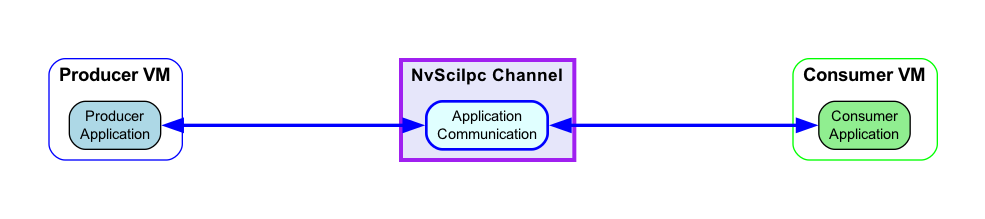
NvSciIpc has reconnection logic built in. If a VM goes down unexpectedly, the recommended behavior is to leave the NvSciIpc endpoint open and wait until the other end resets the connection and reconnects. The key is to establish an application message that indicates a reset state.
The NvSciIpc channel must already be in the established state before a VM restart occurs. If rapid successive VM restarts are performed where the channel is only partially established, this results in indeterminate behavior during reconnection attempts. A complete system reset is required if a VM is restarted before completing its initialization.
Note
Data in flight may be lost when reset is called from the rebooting client.
Using NvSciStream#
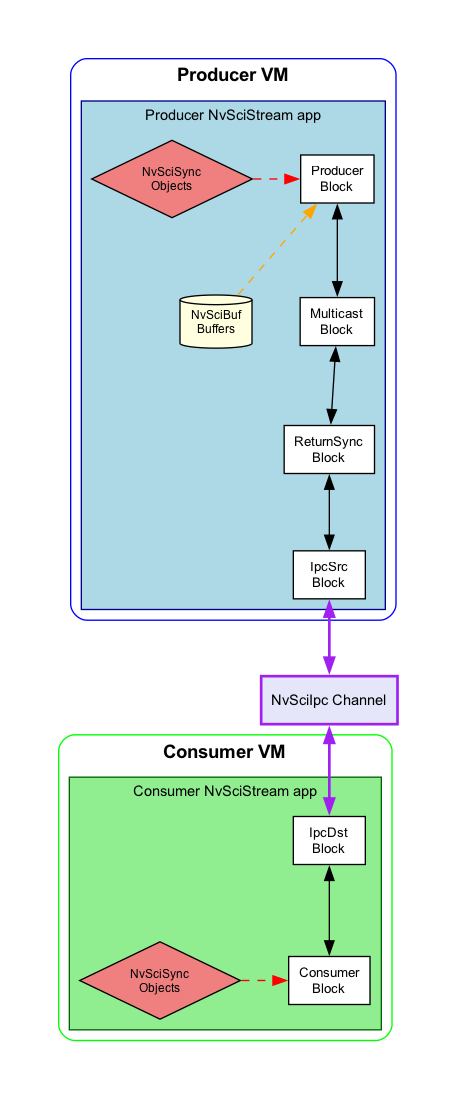
NvSciStream allows the producer application to detach and later re-attach when it discovers that a consumer in a different VM is unhealthy.
Prerequisites:
ReturnSync Block –- performs CPU waits on consumer NvSciSync fences to prevent timeouts before forwarding data upstream. Place it between the Multicast block and the IpcSrc block(s).
Multicast Block –- required to enable detach and re-attach. Place it between the Producer block and the ReturnSync block. It allows disconnecting and reconnecting individual IpcSrc blocks without tearing down the entire stream. Before connecting the Multicast block, configure it to handle zero consumer scenarios by calling
NvSciStreamBlockConfigwith theNvSciStreamConfigKey_DisconnectWithZeroConsumerkey set to0. This prevents the stream from disconnecting when all downstream consumers are detached and allows new consumers to be attached later.
The steps to follow are:
Disconnect (
NvSciStreamBlockDisconnect) and delete (NvSciStreamBlockDelete) the IpcSrc blocks and their associated ReturnSync blocks to the restarting VM.When the new VM is ready, create a new ReturnSync block (
NvSciStreamReturnSyncCreate), create a new IpcSrc block (NvSciStreamIpcSrcCreate2), and connect them to each other and to the Multicast block (NvSciStreamBlockConnect).
Using NvSciBuf, NvSciSync, and NvSciIpc#
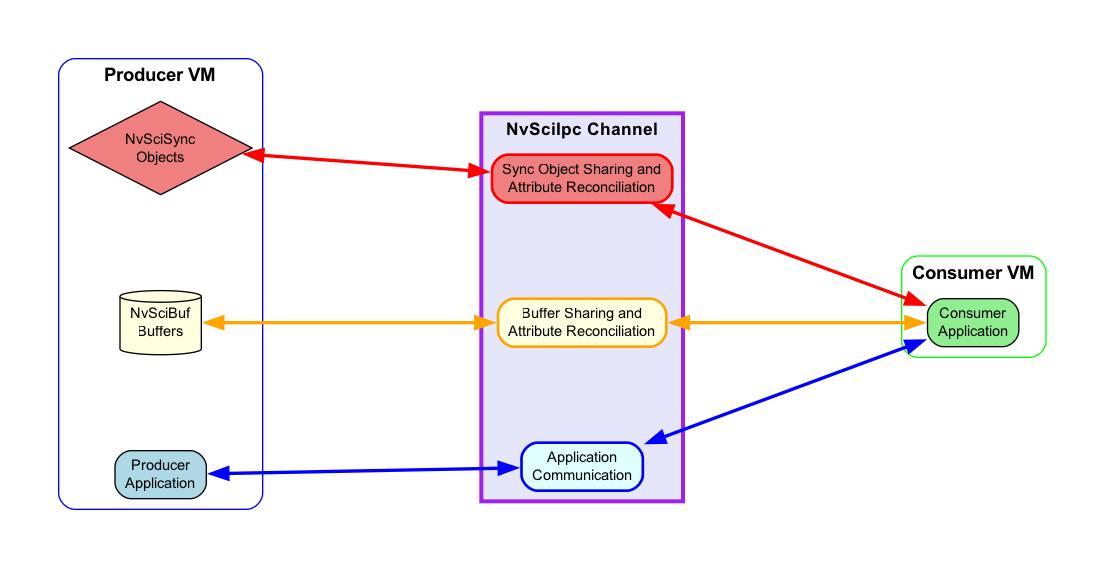
If the application is sharing Inter-VM buffers without NvSciStream, the buffer needs to be reshared when the VM returns.
Prerequisite:
NvSciSync object allocation – this recovery approach requires that sync objects to be preserved are allocated by the producer VM. Consumer-allocated sync objects cannot be preserved across crashes. If the producer sync object cannot be preserved, then the recovery steps described below are not possible. Instead, restart all participating applications and rebuild all NvSci objects.
The steps to follow are:
Consumer application that restarted creates (
NvSciBufAttrListCreate) and exports (NvSciBufAttrListIpcExportUnreconciled) unreconciled lists as before.Producer imports unreconciled attributes (
NvSciBufAttrListIpcImportUnreconciled), validates, grants access (NvSciBufObjAttachPeer), and exports reconciled attributes (NvSciBufAttrListIpcExportReconciled) plus buffer objects (NvSciBufObjIpcExport).Consumer imports reconciled attributes (
NvSciBufAttrListIpcImportReconciled) and buffer object (NvSciBufObjIpcImport).Consumer application that restarted creates (
NvSciSyncAttrListCreate) and exports (NvSciSyncAttrListIpcExportUnreconciled) unreconciled lists as before.Producer imports unreconciled attributes (
NvSciSyncAttrListIpcImportUnreconciled), validates, grants access (NvSciSyncObjAttachPeer), and exports reconciled attributes (NvSciSyncAttrListIpcExportReconciled) plus sync objects (NvSciSyncObjIpcExport).Consumer imports reconciled attributes (
NvSciSyncAttrListIpcImportReconciled) and sync object (NvSciSyncObjIpcImport).
Note
The rawstream example illustrates how this works through the “crash recovery” command line option. See README.txt in the rawstream example for more information.