

Graphics Component Overview#
This topic provides a high-level overview of the graphics software components and programming guidance for NVIDIA DRIVE AGX™ platforms. The graphics stack supports a range of APIs and tools, with Vulkan SC, Vulkan, OpenGL ES, EGL, and Weston supported in production automotive applications.
Graphics Components Diagram#
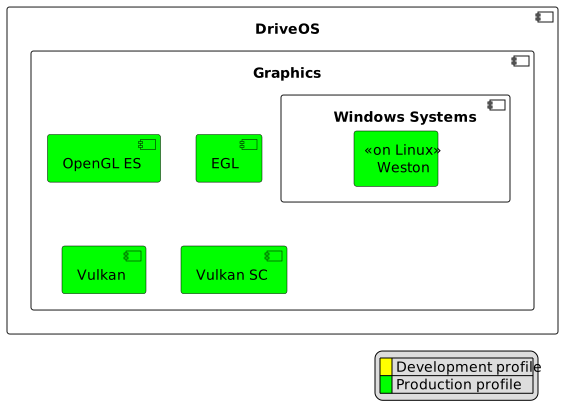
Supported graphics components and profiles in DriveOS#
The previous diagram illustrates the main graphics components supported by DriveOS, categorized by their usage in development and production profiles:
Vulkan SC (Production profile): Safety-critical graphics API recommended for production automotive applications.
Vulkan (Production NSQ (Non-Safety Qualified) profile): Full-featured Vulkan API for advanced graphics.
OpenGL ES (Production NSQ profile): Widely-used embedded graphics API, included in DriveOS for legacy applications.
EGL (Production NSQ profile): Interface between rendering APIs such as OpenGL ES or Vulkan and the underlying native platform windowing system.
Window Systems:
Weston (Production profile, on Linux): Wayland compositor providing windowing and display management for graphics applications on Linux.
Warning
X11 is deprecated in DriveOS 7.2 and is not available in production profiles.
The color coding in the diagram legend indicates:
Yellow: Development profile components (not for production use)
Green: Production profile components (recommended for deployment)
Introduction#
The graphics subsystem enables advanced rendering, compute, and display capabilities for automotive applications. This overview summarizes the main areas of the graphics programming documentation:
Vulkan SC Guidance: Best practices and recommendations for using Vulkan SC, the safety-critical version of Vulkan, including performance tuning, validation, and fault handling.
Building and Running Samples: Step-by-step instructions for building and running sample applications for Vulkan SC, Vulkan, and OpenGL ES.
GPU Scheduling Improvements: Details on GPU scheduling features, sample applications, and configuration for optimal performance.
GPU Debugger and Profiler Support: Security considerations and procedures for enabling/disabling GPU debugging and profiling tools.
OpenGL ES Programming Tips: Tips and best practices for efficient OpenGL ES application development, including memory management and performance optimization.
EGLStream: Guidance on using EGLStream for efficient cross-process and cross-partition graphics pipelines.
Binary Shader Program Management: Information on managing, caching, and optimizing binary shader programs.
GLSLC Shader Program Compiler: Usage and characteristics of the GLSLC shader program compiler and on-demand library loading.
Further Reading#
For additional information, refer to the following topics:
These sections provide in-depth technical details, code samples, and configuration steps.