

NvLogging#
NvLog is the SOC logging solution for NVIDIA DriveOS™. NvLog triages and debugs in-field failures. This feature is supported for all build variants of AV + L and AV + Q. The following section explains the high-level architecture of NvLog.
High-Level Architecture#
Early Boot Logging Framework#
SOC Logging is enabled for the following logging entities:
MB1
MB2
SC7rf
MB2rf
ATF
BPMP-FW
PSC-FW
HPSE-FW
SB-FW
MB1 detects errors reported by the previous entities and passes the information to the MCU by communicating over the SPI interface.
Log Types#
MB1 passes two types of code and logs to MCU:
Progress codes: These are the codes to denote the failure entity and the task during which the error occurred.
Error codes: These are the codes to denote the failure reason.
Reset reason and reset level are also reported.
Log Format#
Each error log line reported on the MCU will consist of three parts:
ReportID
Error_Attribute
Error_Code
Details on how to format them are given below.
ReportID#
ReportID should be 0x8141 denoting errors are reported by MB1.
Error_Attribute#
Error_Attribute[0:7] is used to denote type of the code.
Code |
Description |
|---|---|
0x01 |
Denotes error code. |
0x02 |
Denotes progress code. |
Error_Attribute[8:15] is used to denote origin of the code.
Code |
Value |
|---|---|
MB1 |
0x1U |
MB2 |
0x2U |
SC7RF |
0x4U |
MB2RF |
0x8U |
BPMPFW |
0x10U |
ATF |
0x20U |
PSCFW |
0x40U |
HPSE |
0x80U |
SB |
0x100U |
Error_Code (when origin is MB1, MB2, SC7rf or MB2rf)#
Error_Code has different bits allocated depending on the Error_Attribute value.
When the Error_Attribute has type as error code, following format is applied:
Error_Code[0:7] is used to denote the error code reason.
Error_Code[8:15] is used to denote auxiliary information for pinpointing the failure condition during debug.
Error_Code[16:23] is used to denote the lowest caller module.
Error_Code[24:31] is used to denote the highest caller module.
When the Error_Attribute has type as progress code, following format is applied:
Error_Code[0:23] is used to denote the progress code
Error_Code[24:31] is used to denote the origin of the progress code
Runtime Logging Framework#
Architecture Diagram
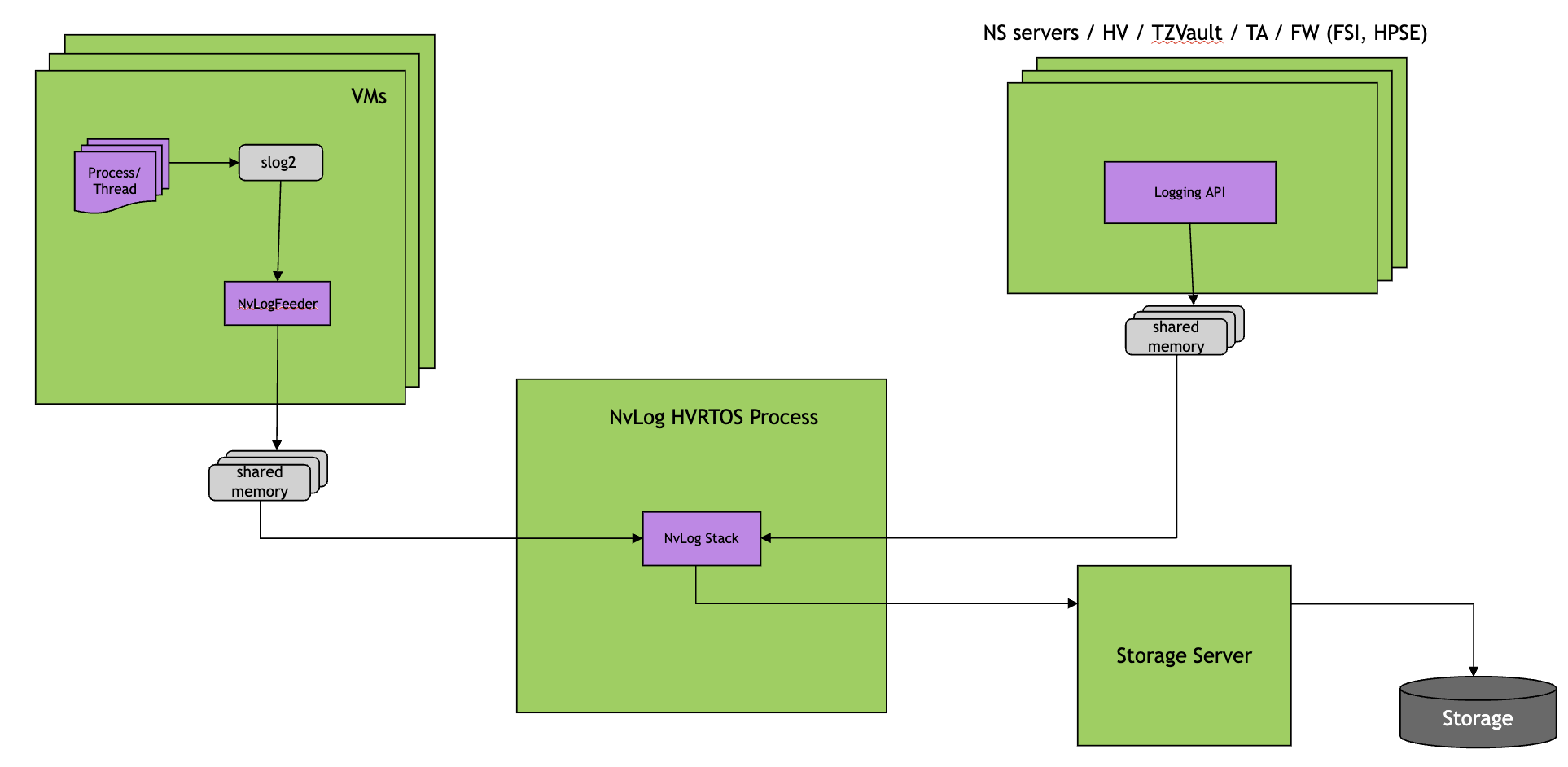
SoC Logging is enabled for the following logging entities:
Applications/libraries in GOS0
Linux and QNX kernel logs
Virtualization servers – BPMP server, Storage server, Ethernet server, SE server, NvHost server, Audio server (if enabled), DRIVE Update server, PCIe server, Display server
Hypervisor kernel (EL2)
Trusted Applications (TAs) on HPSE
Auxiliary processors such as RCE, PVA, FSI, DCE, DLA (if available)
Log Types#
To avoid system-wide KPI impact due to heavy logging, in DriveOS 7.2 only the following types of messages are logged by all logging entities:
INFO messages at important checkpoints during init
ERROR messages at run time
Log Format#
The logs are stored in custom NVIDIA format. The following is a sample log.
TIMESTAMP  | ENTITY_ID  |   PID  |  TID  | TYPE  | LEVEL  | MSG
 145318740         500        8       0       0        1   [SS_UFS]: VSC NvLog is Enabled
7476300256           0   737425       1       0        2   [TS=2488520317] MsgReceive
2494704578           0   101581       1       0        2   Test CNT = 0
TIMESTAMP: Timestamp of a log message
ENTITY_ID: Logging entity ID in hexadecimal after removing NVLOG_EID_MARK
PID: Process ID
TID: Thread ID
TYPE: Type of a log message.
NVLOG_MSG_TYPE_STRINGis used for text log payloads, andNVLOG_MSG_TYPE_BINARYis used for raw binary streams.LEVEL: Verbosity level of a log message
MSG: Payload of a log message
The full list of logging entity IDs are found in nvlog_entity_ids.h, whose location is as follows:
${NV_WORKSPACE}/${LINUX_TARGET_SDK}/include/include/nvlog_entity_ids.h
Here is a snippet of some logging entities.
/**
 * @details Entity IDs for NvLog
 *    [15:8]  Entity ID
 *    [7:0]   Entity specific sub ID, if necessary
 */

/** @details Entity ID of GOS0 VM (The primary Guest VM) */
#define NVLOG_ENTITY_ID_GOS0_VM             (0x0000U)
/** @details Entity ID of GOS1 VM (The secondary Guest VM */
#define NVLOG_ENTITY_ID_GOS1_VM             (0x0200U)
/** @details Entity ID of Secure World */
#define NVLOG_ENTITY_ID_SECURE              (0x0400U)
/** @details Entity ID of Non-Secure World */
#define NVLOG_ENTITY_ID_NONSECURE           (0x0500U)
...
For consistency in timestamp of logs, NvLog uses TSC (Tegra System Counter) counter value as a timestamp of each log.
The NvLog output file has two cases of logs:
Case 1: Log containing a timestamp token of “[TS:nnnnnn]”
This is the case where logging entity logs original timestamp using this token.
When client applications, which are running on Linux based VM, use NvOS_S3 logging APIs, NvOS_S3 logging API adds a timestamp token of “[TS:nnnnnn]”, where <nnnnnn> means TSC counter value, at the beginning of a log message.
External FW such as PVA, RCE, FSI will also add a token: “[TS:nnnnnn]” at the beginning of the log message.
Case 2: Log not containing a timestamp token
TSC counter value is displayed in the “TIMESTAMP” column.
The post-processing script will pick the correct timestamp value.
Logging by Different Logging Entities#
Logging Entities store their logs in dedicated memory buffers.
The nvlog_server running as a HVRTOS process periodically wakes up and
snoops all shared memory buffers. If there are new logs found in the
buffers, it will fetch those logs and store them in dedicated storage
partition using raw storage writes in nvlog specific format. All
these buffers are circular buffers. If the buffer is full, then for
storing new logs, earlier logs in the buffer will be overwritten.
Log Collection#
The logs from all the Logging Entities are collected in a storage partition.
The storage partition is shared between and accessible to both
nvlog_server(read/write) and GOS0 (read-only).Logs are stored along with a timestamp counter in nvlog format.
The logs are fetched from the target and parsed offline on the host. Text-protocol logs are sorted by timestamp by
nvlog_parser.Sorted text logs and extracted binary streams can then be analyzed further for debugging.
Logs for successive boot cycles are maintained in dedicated subpartitions of the storage partition. The number of previous boot cycles retained is configurable via the
num_bootcyclesdevice tree property in thenvlog_servernode. See Multiple Boot Cycle Configuration for details.
Control Knobs to Enable and Disable Logging for Entities#
Additional control knobs in PCT enable and disable logging for a specific logging entity and set the logging buffer size.
Parameter |
Purpose |
Location |
|---|---|---|
bpmp_server_native_conf.nvlog_buff_size |
Logging buffer allocated to BPMP server. If set to zero, logging from BPMP server will be disabled. |
PCT (platform_config.h) |
se_server_native_conf.nvlog_buff_size |
Logging buffer allocated to SE server. If set to zero, logging from SE server will be disabled. |
PCT (platform_config.h) |
ethernet_server_native_conf.nvlog_buff_size |
Logging buffer allocated to Ethernet server. If set to zero, logging from Ethernet server will be disabled. |
PCT (platform_config.h) |
vsc_server_native_ufs_conf.nvlog_buff_size |
Logging buffer allocated to UFS storage server. If set to zero, logging from UFS server will be disabled. |
PCT (platform_config.h) |
vsc_server_native_sdmmc_conf.nvlog_buff_size |
Logging buffer allocated to SDMMC storage server. If set to zero, logging from SDMMC server will be disabled. |
PCT (platform_config.h) |
vsc_server_native_qspi_conf.nvlog_buff_size |
Logging buffer allocated to QSPI storage server. If set to zero, logging from QSPI server will be disabled. |
PCT (platform_config.h) |
audio_server_native_conf.nvlog_buff_size |
Logging buffer allocated to Audio server. If set to zero, logging from Audio server will be disabled. |
PCT (platform_config.h) |
Vm_server_conf.nvlog_buf_size |
Logging buffer allocated to nvhost server. If set to zero, logging from nvhost server will be disabled. |
PCT (platform_config.h) |
du_server_conf.nvlog_buf_size |
Logging buffer allocated to DU server. If set to zero, logging from DRIVE Update server will be disabled. |
PCT (platform_config.h) |
pcie_server_native_conf.nvlog_buff_size |
Logging buffer allocated to PCIe server. If set to zero, logging from PCIe server will be disabled. |
PCT (platform_config.h) |
display_server_conf.nvlog_buff_size |
Logging buffer allocated to display server. If set to zero, logging from display server will be disabled. |
PCT (platform_config.h) |
platform_conf.nvlog_size |
Logging buffer allocated to HV kernel. If set to zero, logging from HV kernel will be disabled. |
PCT (platform_config.h) |
Note
For Virtualization servers, the buffer size mentioned in the PCT is divided equally among all the threads/LCPUs.
The minimum required buffer size is 0x4520 bytes per thread.
Execution Steps#
Early Boot Logging Framework#
To enable Boot Logging Framework, set the enable_early_error_reporting field in the MB1-BCT dtsi file located at:
${NV_WORKSPACE}/hardware/nvidia/platform/t264/automotive/bct/<BOARD_TYPE>/misc/tegra264-mb1-bct-misc-<board_type>.dts
This field is set to <1> by default, denoting that the framework is enabled. To disable the framework, set the field to <0>.
Runtime Logging Framework#
On boot, nvlog_server initializes and maps the shared memory regions created by Drive OS servers
into its address space. It also allocates a memory region for the GOS0 logs (slog2info logs) to
be stored by the GOS0. The server then initializes the shared storage partition between GOS0 and
itself.
The GOS0 uses an application called nvlog_gos to stream the logs to the shared memory. The
application starts up early during the boot, as soon as the GOS0 boots. Similarly the Drive OS
servers and firmwares, start logging into the shared memory allocated by them and shared with
the nvlog_server.
After the basic initialization is done, the server starts a timer that fires periodically. On receiving the timer callback, the server polls over every initialized shared memory region and uses the tracebuf protocol for text producers and the raw protocol for binary producers. The log is encapsulated in a specific format by the logging entities and then written to the shared memory.
These logs retrieved from the shared memory are written to the dedicated storage partition for every logging entity. To retrieve and analyze the logs, the user needs to read the storage partition using userspace tools and parse the partition dump offline on the host.
The following steps describe the retrieval of the logs:
Read the raw storage device (/dev/vblk_ufsf0) from GOS console:
# On QNX target –
toybox dd if=/dev/vblk_ufsf0 of=/tmp/raw-logs.bin bs=1M count=512
# The above values can change based on the partition size

# On Linux target –
dd if=/dev/vblkdev15 of=/tmp/raw-logs.bin bs=1M count=512
# The above values can change based on the partition size
Alternative method if GOS console is not available or there are boot failures restricting the above workflow. This method uses the RCM kernel to extract the nvlog partition using adb shell:
# On flashing host, after resetting the tegra and booting into recovery (similar to normal flashing flow):
# Add the option  ``--read-partition nvlog-server-rw`` at the end of the flashing command for the respective board/platform. For example, for a Thor P3960 TS1 board:
#
# sudo python3 ./flash_bsp_images.py -b p3960-10-sw01 -D -P $FLASH_DIR/642-63960-0010-000_TS1 --board_config $FLASH_DIR/tools/flashtools/board_configs/p3960-10-sw01.json --read-partition "nvlog-server-rw"
#
# This extracts the nvlog partition for chain A/B and create the output files under /tmp (/tmp/A_nvlog-server-rw.bin and /tmp/B_nvlog-server-rw.bin). Rename the required chain file to raw-logs.bin and proceed with the following steps.
Copy the captured
raw-logs.binto a host that has either the built AV+Q source tree or QNX SDK installed, then run the following parser command to extract text logs and binary streams. Add-tor--detect-binary-typeif you want recognized binary streams to be renamed by type.export LOG_OP_DIR=<directory path where logs are to be extracted> ${QNX_TARGET_SDK}/samples/tools/nvlog/scripts/host/nvlog_parser -f /tmp/raw-logs.bin -d $LOG_OP_DIRThe parser creates the following directory structure under
$LOG_OP_DIR. Only directories containing valid logs are created.bootcycle_previous_<n>directories for boot cycles that have not yet occurred are absent. The maximum number ofbootcycle_previous_<n>directories isnum_bootcycles - 1, sincenum_bootcyclescounts the current boot cycle as well. For more information, see Multiple Boot Cycle Configuration:$LOG_OP_DIR/ +-- bootcycle_current/ # Logs from the current boot cycle | +-- sorted_client_logs_0.txt # Sorted text logs, if present | +-- bin/ | | +-- binary_<pid>_<tid>.bin # Binary streams, if present +-- bootcycle_previous_0/ # Most recent previous boot cycle | +-- sorted_client_logs_0.txt | +-- bin/ | | +-- binary_<pid>_<tid>.bin +-- bootcycle_previous_1/ # Older retained boot cycle, if configured | +-- ... +-- bootcycle_previous_<N-2>/ # Oldest retained previous boot cycle +-- sorted_client_logs_0.txt +-- bin/ | +-- binary_<pid>_<tid>.binThe index
ninbootcycle_previous_nis zero-based:_0holds the most recent previous boot cycle logs and_<N-2>holds the oldest retained previous boot cycle whennum_bootcyclesisN.Text-protocol logs are sorted by timestamp and written as
sorted_client_logs_<n>.txt. Raw-protocol logs are written underbin/asbinary_<pid>_<tid>.binby default. With-t,nvlog_parserinspects each binary stream, renames recognized streams by type. Unknown streams remain.binfiles.
Runtime Logging Controls#
The nvlog_server supports runtime controls for logging from QNX GOS through dedicated IVC channels. The IVC commands are
routed through the nvlog_gos application. A trusted client application can use the libnvlog_api.so and send targeted commands
to the nvlog_gos and/or the server. Any command intended for the server will be first received by the nvlog_gos and based on
the command parameters, forwarded to the server over another dedicated IVC channel.
The following operations are currently supported:
Immediate flushing of the logging buffers on-demand (the logging buffers are normally sweeped periodically)
Runtime enabling/disabling of the logging functionality
Log level control of logging entity’s global log level or a specific process that belongs to a logging entity
The API is documented in the nvlog user library header file at - ${NV_WORKSPACE}/${QNX_TARGET_SDK}/include/nvlog_api.h
A nvlog test application binary and source code are package in SDK. Locations are as follows:
AV+L:
    ${NV_WORKSPACE}/${LINUX_TARGET_SDK}/samples/nvlog_control/src/
    ${NV_WORKSPACE}/${LINUX_TARGET_SDK}/samples/nvlog_control/bin/nvlog_control_test
Supported Commands#
typedef enum {
    NVLOG_ACTION_DISABLE       = 0U,     // Disable Logging
    NVLOG_ACTION_ENABLE        = 1U,     // Enable Logging
    NVLOG_ACTION_FLUSH         = 2U,     // Flush Logging
    NVLOG_ACTION_SET_LOG_LEVEL = 3U,     // Set log level of a process
};
Supported Log Levels#
typedef enum {
    NVLOG_LEVEL_SHUTDOWN,     // Shutdown - System shutdown or fatal error
    NVLOG_LEVEL_CRITICAL,     // Critical - Critical error condition
    NVLOG_LEVEL_ERROR,        // Error - Error condition
    NVLOG_LEVEL_WARNING,      // Warning - Warning condition
    NVLOG_LEVEL_NOTICE,       // Notice - Normal but significant condition
    NVLOG_LEVEL_INFO,         // Info - Informational message
    NVLOG_LEVEL_DEBUG,        // Debug1 - Debug-level message
    NVLOG_LEVEL_LOG_DISABLE,  // Log Disable (Only valid for global log level control at a logging entity level)
} NvLogLevel;
The NVLOG_ACTION_DISABLE/NVLOG_ACTION_ENABLE sent to the server causes the server to stop/start logging respectively.
Similarly NVLOG_ACTION_FLUSH sent to the server will cause the server to sweep the memory buffers
immediately without waiting for the timer based invocation.
The NVLOG_ACTION_SET_LOG_LEVEL is used to control global log level of a logging entity or log level of a specfic process that
belong to a logging entity.
Here are some examples for log level control.
// Have to run nvlog_control_test first as background and then write a command to /tmp/nvlog_test_cmd file.
# nvlog_control_test &

// Example 1) Change the log level of process ID 1234, which is running on Guest VM0, to INFO (=5).
# echo '-a 3 -t 0x0 -p 1234 -l 5' > /tmp/nvlog_test_cmd
[TEST 01] NvLogControl() with a given command
Logging Control Command --------
  action : NVLOG_ACTION_SET_LOG_LEVEL
  target : NVLOG_ENTITY_ID_GOS0_VM
  - pid  : 1234
  - level: NVLOG_LEVEL_INFO
--------------------------------
  Expected: NVLOG_SUCCESS
  Actual  : NVLOG_SUCCESS
  Result  : PASSED
----------------------------------------------------

// Example 2) Change the global log level of Guest VM0, to WARNING(=3).
//            For global log level control, "-p -1" should be specified
# echo '-a 3 -t 0x0 -p -1 -l 3' > /tmp/nvlog_test_cmd
[TEST 02] NvLogControl() with a given command
Logging Control Command --------
  action : NVLOG_ACTION_SET_LOG_LEVEL
  target : NVLOG_ENTITY_ID_GOS0_VM
  - pid  : -1
  - level: NVLOG_LEVEL_WARNING
--------------------------------
  Expected: NVLOG_SUCCESS
  Actual  : NVLOG_SUCCESS
  Result  : PASSED
----------------------------------------------------
PCT and DT Changes#
The following PCT entry is needed for the primary GOS to be able to send an IVC command to the server.
The property .is_nvlog_server_enabled should be set to 1 and .ivc_conf should be filled with correct
mempool information.
If a secondary VM is enabled and log level control is also needed in that VM nvlog_gos, an IVC queue
is needed to be added to .queues under .ivc DT node.
The HV allocates the IVC queues in .queues and is used for communication between the
nvlog_gos running in specified guest VMs.
PCT configuration:
.ivc = {
    .queues = {
#ifdef ENABLE_GUEST1_VM
        [GOS0_GOS1_Q_459] = { .peers = {GID_GUEST0_VM, GID_GUEST1_VM}, .nframes = 8, .frame_size = 256 },
#endif
    ...
    }
},

.nvlog_server_conf = {
#ifdef ENABLE_HVRTOS_NVLOG_SERVER
    .is_nvlog_server_enabled = 1,
    .ivc_conf = {
        [GID_GUEST0_VM] = {
            [0] = {
                .name = "nvlog_server<->gos0.slog",
                .mempool_id = NVLOG_SERVER_M_150,
                .mempool_alignment_size = 4096,
                .mempool_size = 0x800000,
                .in_use = 1,
                .protocol = PROTOCOL_TRACEBUF,
            },
            ...
        },
#if (NR_VM == 2)
        [GID_GUEST1_VM] = {
            [0] = {
                .name = "nvlog_server<->gos1.syslog",
                .mempool_id = NVLOG_SERVER_M_154,
                .mempool_alignment_size = 4096,
                .mempool_size = 0x800000,
                .in_use = 1,
                .protocol = PROTOCOL_TRACEBUF,
            },
        },
#endif
    },
#else
    .is_nvlog_server_enabled = 0,
#endif
},
The above GOS DT entry is required for the nvsciipc library and IVC channel establishment between the application
invoking the logging controls and the nvlog_gos, similarly for the nvlog_gos to open the connection with the server.
The “INTER_VM” queue is created by the hypervisor using the PCT entry above, while the “INTER_PROCESS” queue is
purely between the 2 processes of the QNX GOS and is created by the libnvlog.so.
Corresponding entry in the GOS DT:
#ifdef ENABLE_HVRTOS_NVLOG_SERVER
        "INTER_VM",      "nvlog_ivc_nvlogserver",  "458",  "0",                   // nvlog_gos (GOS0) -> NvLog Server
#endif
#ifdef ENABLE_GUEST1_VM
        "INTER_VM",      "nvlog_ivc_gos0_gos1",    "459",        "",              // nvlog_gos (GOS0) -> nvlog_gos (GOS1)
#endif

        "INTER_PROCESS", "nvlog_ivc_client_0", "nvlog_ivc_client_1", "4", "128";  // client app (GOS0) -> nvlog_gos (GOS0)
NvLog Server Timer Configuration#
The nvlog_server mempool sweep interval is configurable through the
nvlog_timer_duration_ms property in the nvlog_server node of the HV
device tree:
nvlog_server {
    status = "okay";
    nvlog_timer_duration_ms = <5000>;
};
nvlog_timer_duration_ms sets the sweep interval (ms) at which the
nvlog_server wakes up to poll all logging entity shared-memory buffers and
flush new logs to the storage partition. The maximum permitted value is 60000 ms
(60 seconds). The recommended minimum value is 1000 ms. Faster sweep intervals
are not fully validated.
Multiple Boot Cycle Configuration#
The nvlog_server can retain logs from multiple previous boot cycles on
the storage partition. Each boot cycle’s logs are written to a dedicated subpartition
so that data from prior reboots is available for post-mortem analysis without being
immediately overwritten. This feature is configured through the nvlog_server
node of the HV device tree:
nvlog_server {
    status = "okay";
    num_bootcycles = <2>;
    subpart_0_pct = <15>;
};
num_bootcycles sets the total number of boot cycles to retain on the storage
partition, including the current boot cycle. When set to N, nvlog_parser
produces one bootcycle_current directory and up to N-1 directories named
bootcycle_previous_0 through bootcycle_previous_<N-2>. Index 0 is the
most recent previous boot cycle. Only directories containing valid logs are
created. The storage partition is split equally across boot cycles.
If absent from the device tree or set to 0, the default value is 2. If
the specified value produces a per-cycle storage length smaller than the combined
minimum sizes of both subpartitions (1 MB + 4 MB = 5 MB), num_bootcycles
falls back to the default value of 2.
subpart_0_pct sets the size of the first subpartition as a percentage of the
storage dedicated to a single boot cycle (valid range: 1–99). The remaining
percentage is allocated to subpartition 1. Subpartition 0 stores tracebuf (text)
logs and subpartition 1 stores binary logs. If absent from the device tree or an
invalid value is specified, the default value is 15.
If the resulting layout would leave subpartition 1 smaller than its 4 MB minimum,
subpart_0_pct falls back to its default value of 15.
Warning
Changing num_bootcycles or subpart_0_pct alters the layout of the
nvlog storage partition. Any logs stored under the previous layout may become
inaccessible after the new device tree is applied, as the subpartition
boundaries and slot assignments will no longer match the on-disk data.
Retrieve and save any required logs before modifying these properties.
With num_bootcycles = <2>, the partition stores logs for two boot cycles:
* the current boot cycle, and
* the most recent previous boot cycle.
After collecting logs and running nvlog_parser, the output directory
structure is as follows (only directories with valid logs are created):
$LOG_OP_DIR/
+-- bootcycle_current/                   # Logs from the current boot cycle
|   +-- sorted_client_logs_0.txt         # Sorted text logs, if present
|   +-- bin/
|   |   +-- binary_<pid>_<tid>.bin       # Binary streams, if present
+-- bootcycle_previous_0/                # Logs from the previous boot cycle
    +-- sorted_client_logs_0.txt
    +-- bin/
    |   +-- binary_<pid>_<tid>.bin
Integration with Customer Applications#
Runtime Logging from customer applications can be integrated with NvLog by linking with NvOS library.
NvOS logging APIs are found in ${SDK_INCLUDE_DIR}/nvos_s3_tegra_log.h.
Assumptions, Restrictions, and Recommendations (ARRs)#
RES-001: Always log only errors at run time#
NvLog framework currently does not support rate limiting. If a logging entity sends logs in large volume, it could impact system-level KPIs. To avoid this, the logging entity is required to send only error logs to NvLog.
RES-002: Avoid repetitive logging#
To avoid a continuous flood of logs, avoid repetitive logging from any logging entity.