
PVA Inference Pipeline in Low-power Mode#
Introduction#
A key advantage of PVA hardware is its excellent energy efficiency. Because it only uses low-power hardware, the overall power consumption of the system is low, making it suitable for low-power scenarios.
The PVA transmits frame data using DMA. To minimize the overhead of DMA bandwidth, especially for I/O-bound tasks, and to reduce system latency, the recommendation is to use fusing-adjacent PVA operators in a single operation. This eliminates the intermediate data transfer process, allowing for effective utilization of internal computing power by reducing data synchronization times.
This PVA function in low-power mode demonstrates a pedestrian detection pipeline that relies solely on PVA.
Data Flow
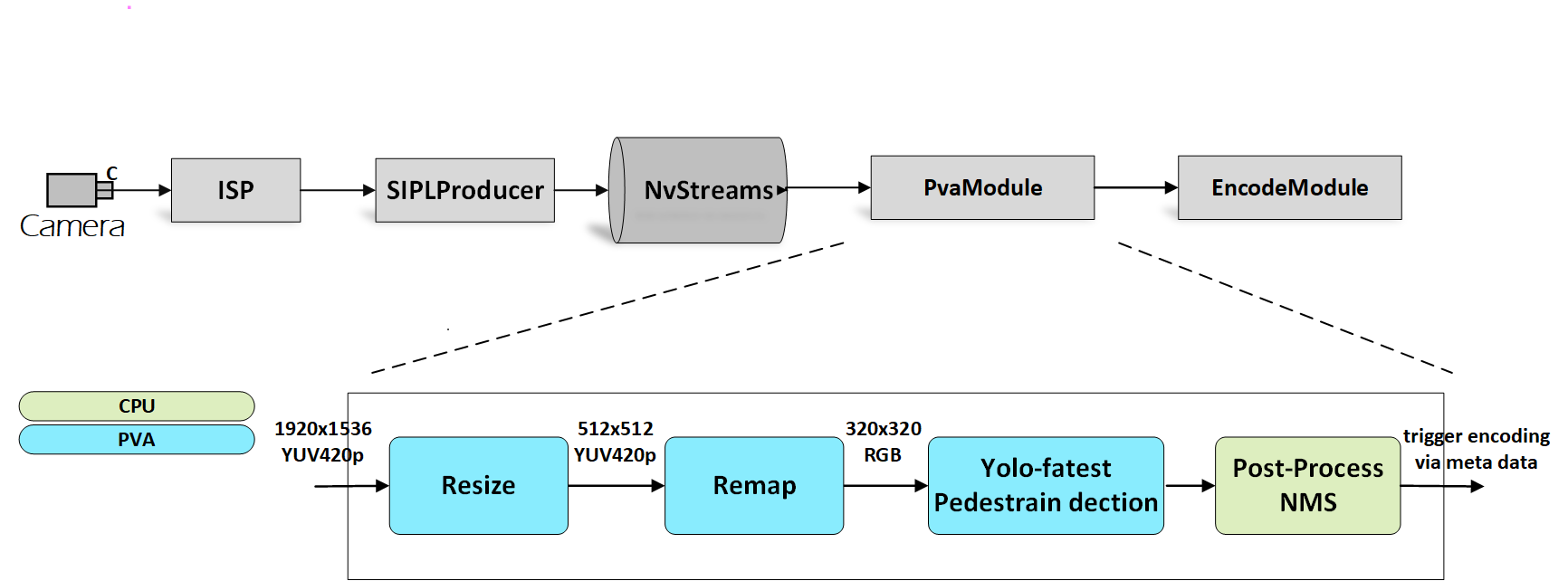
In the previous graph, a PVA module is introduced in the pipeline. It receives the YUV frames from NvStreams, performs pre-processing, and runs the Yolo-fastest model to detect pedestrians,and then performs post-processing. When pedestrians are detected, the PVA module triggers the Encode module to encode the YUV frames to the H.264/H.265 format and saves them to local files.
The “Resize” operator is required because it needs a larger scaling ratio than the fused PVA “Remap” operator.
The operations of the fused PVA remap operator include remapping, resizing, and color conversion. These operations are fused into a simple operation for better performance.
The PVA-based Yolo-fastest model serves as the inference model for pedestrian detection. The PVA has the capability to run special AI models for inference, which helps offload the GPU or DLA resources.
To enable this feature, complete the following steps:
Ensure the cameras whose resolution and output image format meet the requirements are connected.
Copy
libcupva_host.so.2.6,libcupva_host_utils.so.2.6, andlibpva_low_power.soto the target device and ensure that the files are in the same folder with thenvsipl_multicastbinary. These files are in Docker undersamples/e2e-solution/lib/gen3/.Create a sub-folder named
datain the current folder and copy the following files into the folder: -boundingBox.txt-XY_FixPtMap.raw-XY_UV_FixPtMap.raw-XY_FixPtMap_Resize.raw-XY_UV_FixPtMap_Resize.rawThese files can be found in Docker under
samples/e2e-solution/multicast/features/low_power_mode/data/.Add the path of the above library files to the environment variable
LD_LIBRARY_PATH.export LD_LIBRARY_PATH=${LD_LIBRARY_PATH}:${PWD}
Enable PVA Authority.
echo 0 | sudo tee /sys/kernel/debug/pva0/vpu_app_authentication
Run the
NvSIPL_Multicastapplication.
Constraints#
PVA authority is required to enable this feature.
The PVA uses fixed-map files to resize or undistort the input image.Now only cameras with resolution of 1920x1536 and isp output format of yuv420p or NV12 are supported. If the camera modules have different resolutions, please contact NVIDIA to request the corresponding map files.
This feature is not currently supported in QNX.