
Recording Sensor Data#
Note
Third-party sensors and accessories noted on this page are for illustrative purposes. Please refer to NVIDIA® DRIVE® Hyperion™ 8.1 Sensors and Accessories for supported sensors and accessories.
Section Name |
Provides guidance on … |
|---|---|
Recording a limited number of sensors on a single SoC. |
|
Developing strategies for recording the huge amounts of data that multiple cameras can produce. | |
NVIDIA DriveWorks contains recording tools that can record, synchronize, and playback the data captured from multiple devices attached to your NVIDIA DRIVE platforms. You can use the recording tools to test sample applications that interact with sensors:
GUI or command line (CLI) recorder tools save sensor data to USB device or another data storage device connected through Ethernet.
AVDiag Tool feeds previously recorded sensor data into your sample application.
The recording applications data can then store the data on a eSATA/USB Drive. The data from each sensor is synchronized with data from other sensors by adding a time stamp to the data.
Recording Capabilities#
The following shows DriveWorks recording capabilities:
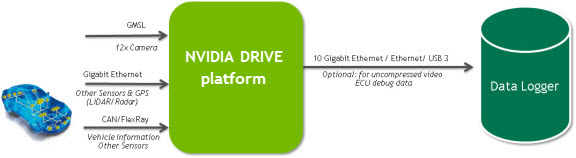
Data Acquisition from Multiple Sensors#
Each sensor acquires and transfers the data to one of the processors on the device. Depending on sensor type, the data may first go through a post-processing step (e.g., encoding for camera) prior to disk serialization. It is important to ensure the storage device’s bandwidth and capacity are sufficient for the sensor set.
Supported Sensors and Sensor Interfaces#
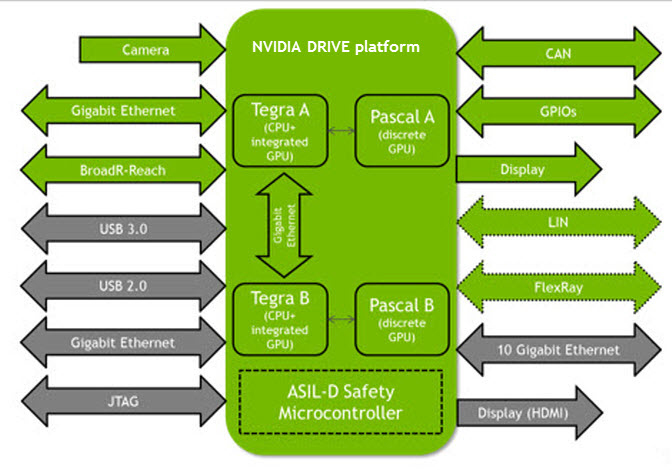
Data Interfaces#
For a list of the supported sensors, see NVIDIA DRIVE Hyperion 8.1 Sensors and Accessories.
The device supports the following interfaces:
Sensor Interfaces#
BroadR-Reach
Controller Area Network (CAN)
FlexRay
General Purpose Input/Output (GPIO)
Gigabit Ethernet (GbE)
Gigabit Multimedia Serial Link (GMSL) Camera
Local Interconnect Network (LIN)
Display and Cockpit Computer Interfaces#
GMSL
HDMI
Development and Debug Interfaces#
10- and 1-gigabyte Ethernet
HDMI
Universal Serial Bus (USB 2 and USB 3)