
Running the Vulkan SC Samples#
This topic describes how to display Vulkan® SC information and how to run the Vulkan SC samples. OpenWFD is supported as a display module for the Vulkan SC samples.
Components#
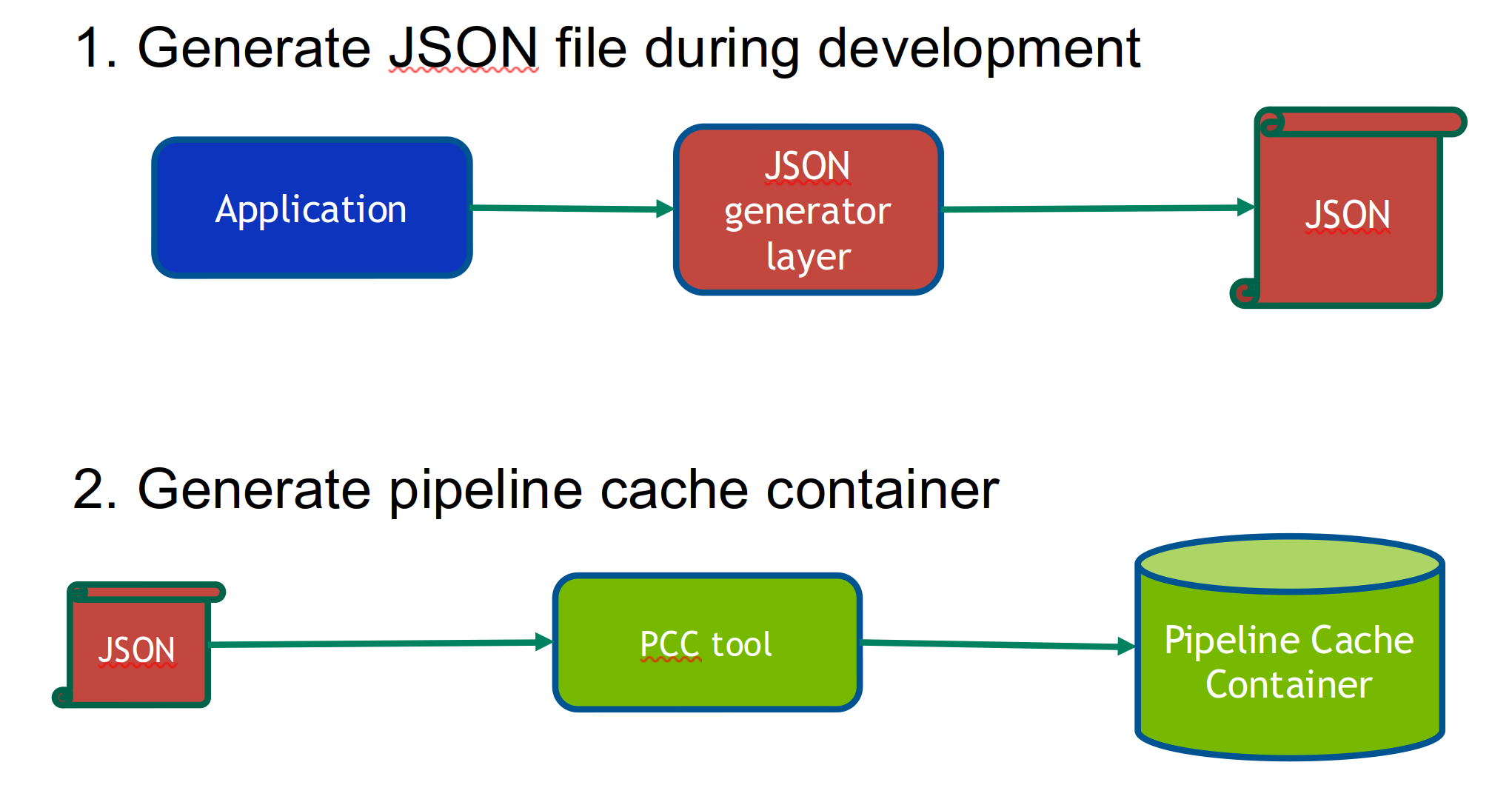
Vulkan SC applications can be developed from Vulkan applications. To develop a Vulkan SC application, you first create a Vulkan application with similar functionality and then extract the offline state needed for the Vulkan SC application. For running and developing Vulkan SC applications, various components are involved:
Vulkan application : The Vulkan application is used to develop the Vulkan SC application.
You use this application to extract the offline state needed for the Vulkan SC application.
JSON generation layer : This layer is used to generate the offline JSON pipeline state and the spir-v files that are needed for the PCC tool.
The library name is
libVkLayer_json_gen.so.Pipeline Cache Compiler (PCC) : The PCC tool is used to generate the pipeline cache that the VKSC application loads.
Workflow#
The following diagram outlines the workflow:
Running the vulkanscinfo Sample (Target)#
The vulkanscinfo command summarizes the core features of Vulkan SC API and saves the output to the text/json/html file.
To get a list of all available options for the
vulkanscinfocommand, specify the--helpoption:cd <VulkanSC-Samples>/build/bin ./vulkanscinfo –-help
To save the output to an HTML file, specify the
--htmloption:cd <VulkanSC-Samples>/build/bin ./vulkanscinfo --html
Running the 01tri Sample (Target)#
Generate pipeline cache by running
vk_01tri.Generate the JSON files.
The
VK_LAYER_KHRONOS_json_genlayer is recommended to help automatically generate the JSON files. However, this layer is only supported on Vulkan; therefore, the Vulkan version of thisvk_01trisample withVK_LAYER_KHRONOS_json_genenabled is also built.Run
vk_01trion target to generate the JSON files as follows:cd <VulkanSC-Samples>/build/bin export VK_LAYER_PATH=/etc/vulkansc/icd.d export VK_JSON_FILE_PATH=$PWD/data/pipeline/vksc_01tri/ ./vk_01tri
Upon successful execution, the following files are generated in
VK_JSON_FILE_PATH:vk_01tri_pipeline_0.jsonvk_01tri_pipeline_0.vert.spvvk_01tri_pipeline_0.frag.spv
Generate the pipeline cache by running the host PCC tool.
The PCC tool provided in the SDK is an x86_64 binary; therefore, run the tool only on x86_64 Linux host machine as follows:
cd <VulkanSC-Samples>/build/bin/data/pipeline/vksc_01tri
${NV_WORKSPACE}/drive-linux/vulkansc/pcc/Linux_x86-64/pcc -chip [ga10b|gb10b] -path ./ -out pipeline_cache.bin
Upon successful execution,
pipeline_cache.binwill be generated in the current folder.
Run the
vksc_01trisample .The
vksc_01trisample already contains a default pipeline cache generated for ga10b and gb10b GPUs, and the cache binary in hex format is embedded in thepipeline_cache.hppfile that is built with thevksc_01tribinary. Therefore, you can run the sample directly by following these steps:Save the off-screen rendering result to an image file.
cd <VulkanSC-Samples>/build/bin
./vksc_01tri -o
After you run commands, an image file
tri.ppmis generated. You can use any image viewer to open it.Display the rendering result by using OpenWFD.
cd <VulkanSC-Samples>/build/bin
./vksc_01tri -w
To run the
vksc_01trisample with the external pipeline cache generated in step 1.cd <VulkanSC-Samples>/build/bin ./vksc_01tri -c -o
Note
By specifying the
-coption, the application will look for thepipeline_cache.binfile in the./data/pipeline/vksc_01tridirectory. Sopipeline_cache.bingenerated in step 1 must be copied to that directory.
Running the computeparticles Sample (Target)#
To read the texture data, the vksc_computeparticles sample uses the libktx.so external library that is located in <VulkanSC-Sample>/external/ktx. Therefore, you must specify the path to the library before running the samples as follows:
export LD_LIBRARY_PATH=<VulkanSC-Sample>/external/ktx/Linux_aarch64:$LD_LIBRARY_PATH
Generate the pipeline cache by running
vk_computeparticles.Generate the JSON files.
The
VK_LAYER_KHRONOS_json_gen layeris recommended to help to automatically generate the JSON files. However, this layer is only supported on Vulkan, therefore the Vulkan version of this samplevk_computeparticleswithVK_LAYER_KHRONOS_json_genenabled is also built.Run
vk_computeparticleson target to generate the JSON files as follows:cd <VulkanSC-Samples>/build/bin export VK_LAYER_PATH=/etc/vulkansc/icd.d export VK_JSON_FILE_PATH=$PWD/data/pipeline/computeparticles/ ./vk_computeparticles
The following files are generated in
VK_JSON_FILE_PATH:vk_computeparticles_pipeline_0.jsonvk_computeparticles_pipeline_0.frag.spvvk_computeparticles_pipeline_0.vert.spvvk_computeparticles_pipeline_1.jsonvk_computeparticles_pipeline_1.compute.spv
This sample uses two different pipelines, graphics pipeline and compute pipeline; therefore, two JSON files are generated.
Generate the pipeline cache by using the host PCC tool.
The PCC tool provided in the SDK is an x86_64 binary, therefore it can only be run on x86_64 Linux host machine as follows:
cd <VulkanSC-Samples>/build/bin/data/pipeline/computeparticles
${NV_WORKSPACE}/drive-linux/vulkansc/pcc/Linux_x86-64/pcc -chip [ga10b|gb10b] -path ./ -out pipeline_cache.bin
Upon successful execution,
pipeline_cache.binwill be generated in the current folder.
Running the
vksc_computeparticlessample .The
vksc_computeparticlessample already contains a default pipeline cache generated for ga10b and gb10b GPUs, and the cache binary in hex format is embedded in thepipeline_cache.hppfile that is built with thevksc_computeparticlesbinary. Therefore, you can run the sample directly.Save the off-screen rendering result to an image file.
cd <VulkanSC-Samples>/build/bin
./vksc_computeparticles -o
Display the rendering result by using OpenWFD.
cd <VulkanSC-Samples>/build/bin
./vksc_computeparticles -w
To run the
vksc_computeparticlessample with the external pipeline cache generated in step 1.cd <VulkanSC-Samples>/build/bin ./vksc_computeparticles -c -o
Note
By specifying the
-coption, the application will look for thepipeline_cache.binfile in the./data/pipeline/vksc_computeparticlesdirectory, sopipeline_cache.bingenerated in step 1 must be copied to that directory.
Alternative Method to Generate JSON Files (Host)#
Regarding generating the JSON files described in step 1.a (Generate the JSON files) , an alternative method can automatically generate the JSON files by using the x86_64 binaries that can be run on x86_64 Linux host machines. To use this method, follow the instructions to build the x86_64 binaries as described in Host x86 Binary Build.
Prerequisites :
Desktop Vulkan (version 1.2 or later) SDK and driver (from NVIDIA) must be installed.
The
VK_LAYER_KHRONOS_json_genlibrary must be available on the host.
To run the vk_01tri_host sample on host,
cd <VulkanSC-Samples>/build_host/bin
export VK_LAYER_PATH=${NV_WORKSPACE}/drive-linux/vulkansc/ecosystem/vulkan-sc-layers/json_generation_layers/binaries/Linux_x86_64
export VK_JSON_FILE_PATH=$PWD/
./vk_01tri_host
To run the vk_computeparticles_host sample on host,
cd <VulkanSC-Samples>/build_host/bin
export VK_LAYER_PATH=${NV_WORKSPACE}/drive-linux/vulkansc/ecosystem/vulkan-sc-layers/json_generation_layers/binaries/Linux_x86_64
export VK_JSON_FILE_PATH=$PWD/
LD_LIBRARY_PATH=<VulkanSC-Sample>/external/ktx/Linux_x86_64 ./vk_computeparticles_host