
Lidar Calibration Sample#
Description#
The NVIDIA® DriveWorks Lidar Calibration sample demonstrates how to use DriveWorks Calibration’s Self-Calibration module. The sample uses ICP (Iterative Closest Point) to determine the relative transform between consecutive sweeps of lidar. Additionally, the sample performs computations on the full point cloud of the latest sweep. Those additional computations are independent of the relative transformation.
Running the Sample#
The command line for the sample is:
./sample_calibration_lidar [options]
Options#
The sample accepts the following optional arguments. If none are specified, the lidar extrinsics are estimated on a default dataset.
- --rig={file.json}[=data/samples/lidar/rig_perturbed.json]#
Path to the rig configuration file.
- --lidar-sensor={integer}[=0]#
The index or name of the lidar sensor in the rig configuration file to calibrate.
- --imu-sensor={integer}[=0]#
The index or name of the IMU sensor in the rig configuration file.
- --can-sensor={integer}[=0]#
The index or name of the CAN sensor in the rig configuration file.
- --output-rig={file.json}[=rig_updated.json]#
Output rig configuration file, which contains updated lidar extrinsics.
- --use-ego-pose=0|1[=1]#
Whether or not ego-motion pose is fed to lidar calibration (in addition to ICP pose).
- --verbose=0|1[=0]#
Whether or not the sample prints detailed estimation together with lidar sweep number.
See also Common Options.
Interactive Controls#
To pause the sample, press Space.
To exit the sample, press Escape.
To rotate and move the camera while the sample is paused, select and drag the image.
Note
Depending on --output-rig, you may need to start the sample with sudo.
Output#
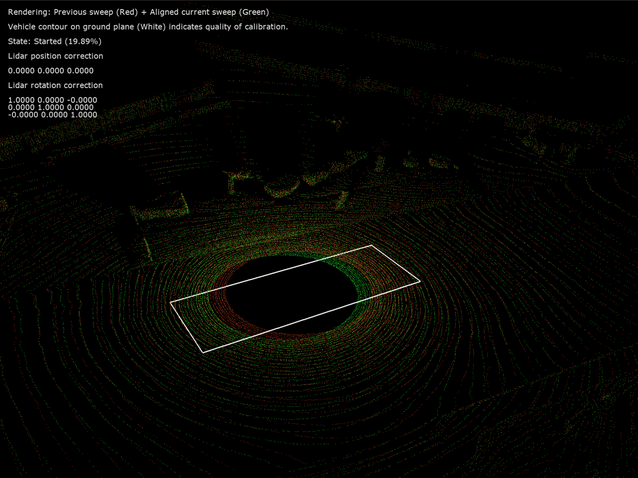
The sample application shows the previous sweep (Red) and the aligned current sweep (Green). After the calibration converges, the contour rectangle on the ground plane should be aligned co-planar with the ground lidar points and parallel to the driving direction.
The sample application also shows the state of the calibration and the percentage completed, along with the computed update to the lidar extrinsics calibration.
Lidar Calibration Sample#
Additional information#
For more information on lidar calibration, see Lidar Self-Calibration.