NVIDIA Workload Map
NVIDIA Workload Map, an open source framework within NVIDIA DSX OS™, gives Kubernetes tools a standard way to understand the structure of AI workloads. It enables schedulers, controllers, and platforms to inspect and manage distributed training jobs, inference services, and custom resource types through a shared, declarative definition.
Designed for developers building across diverse workload frameworks, Workload Map describes resource hierarchies, pod specifications, scaling parameters, and status in a reusable format. Its Go library lets tools read and update workloads through a common API, making it easier to support new workload types without maintaining separate integration code for each one. Workload Map is already used by KAI Scheduler, NVCF, NVIDIA Recovery (Heimdall), and Elotl Nova.
How NVIDIA Workload Map Works
Kubernetes workload types share common building blocks but organize them differently. Workload Map uses declarative definitions and JQ expressions to map those fields into a consistent structure that tools can interpret across frameworks.
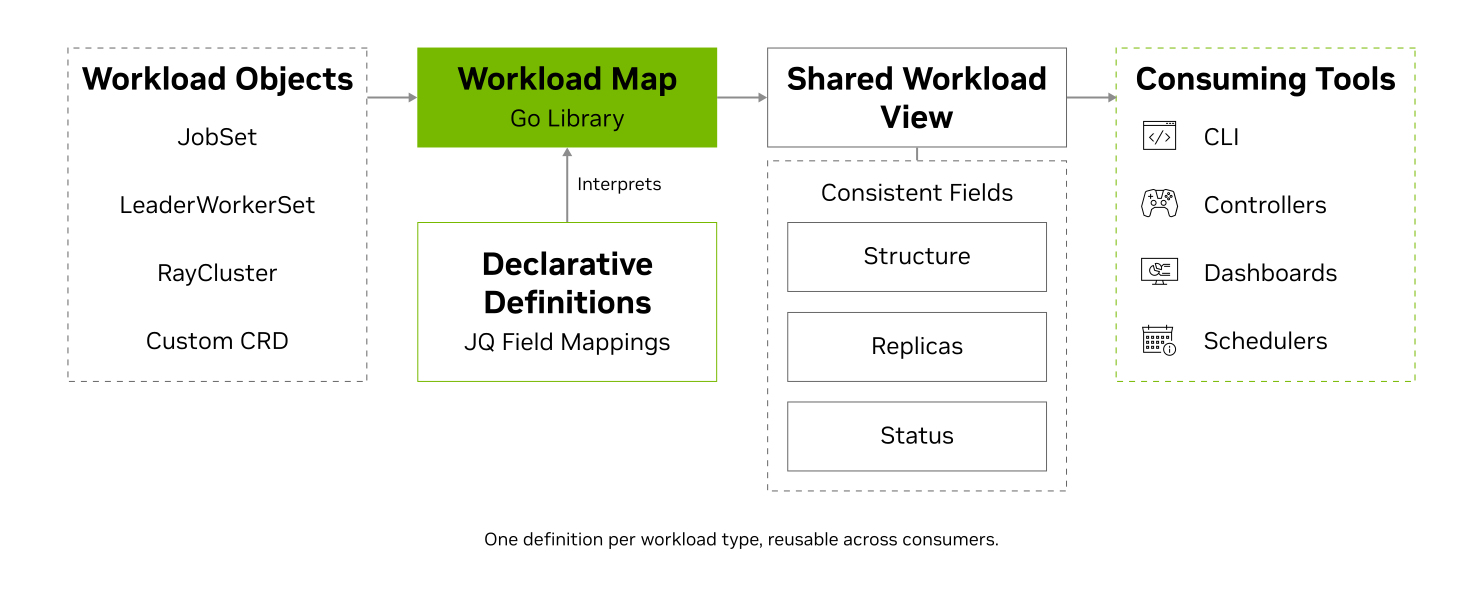
Workload Structure: Describe root resources, child components, and pod templates so tools can understand how a workload’s roles and resources fit together.
Scaling Information: Map replica counts and scaling fields so tools can read each component’s intended scale through the same API, regardless of workload type.
Workload Status: Map workload-specific conditions to common states such as running, completed, and failed so tools can interpret progress consistently across workload types.
Gang Scheduling: Tell schedulers which pods belong together, so a job is admitted as one unit instead of landing halfway and waiting. This works for frameworks the scheduler has never seen, once they have a definition.
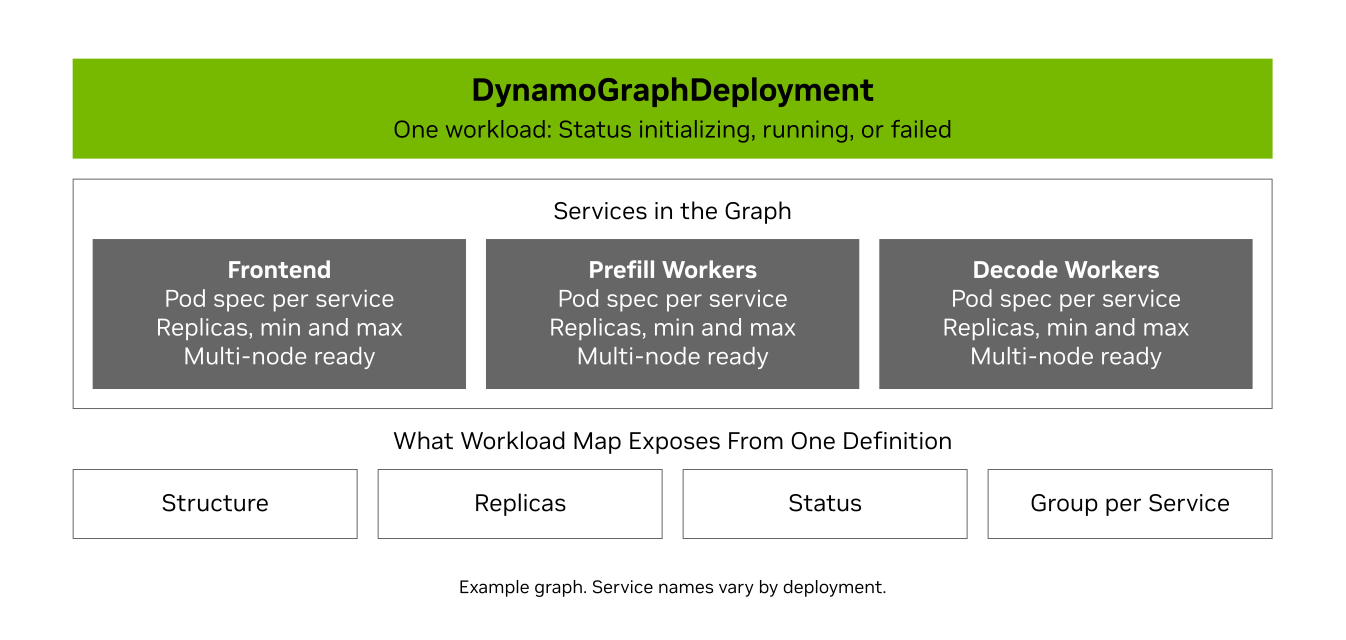
Example: A DynamoGraphDeployment
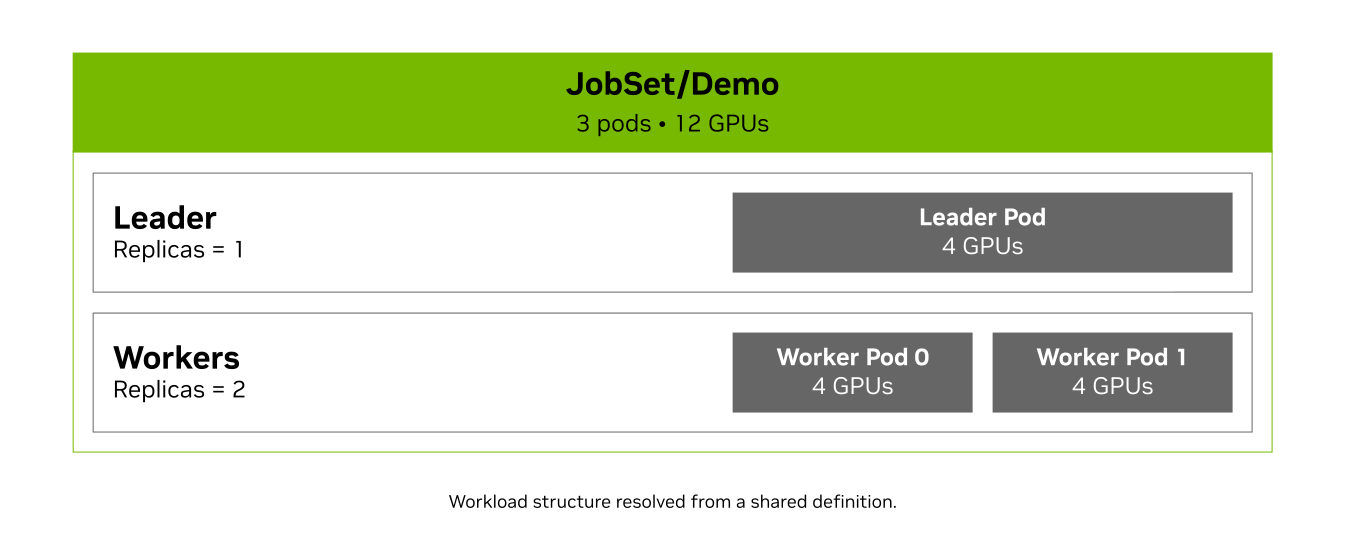
A DynamoGraphDeployment describes a multi-service inference graph as one workload. This example has a frontend, a prefill worker service, and a decode worker service, each with its own pod spec and autoscaling range. The green header represents the complete deployment, the light gray section groups its services, and the dark gray blocks represent individual services. Workload Map exposes this structure through the matching definition: per-service pod specs; replicas with min and max; a status of initializing, running, or failed; and a gang-scheduling group per service.
Quick-Start Guide
Run your first Workload Map example and explore how a common API reads and updates different Kubernetes workload types.
Why Workload Map: The Workload Integration Problem
Learn how declarative workload definitions reduce the repeated integration work that comes with supporting new Kubernetes frameworks.
Discover More About Workload Map
Explore the definition schema, Go API, and workload catalog to build integrations for your controllers, schedulers, and platforms.
Get Started With NVIDIA Workload Map
Explore an existing workload definition and bring a common workload API to your Kubernetes tooling.

Get Workload Map Running
Install the CLI to inspect workload structure, or add the Go library to your application. For integrations that store definitions in Kubernetes, install the CRD and apply one of the pre-built definitions (JobSet, PyTorchJob, RayCluster, KServe, Dynamo, and more) or write your own.

Take a Deep Dive Into NVIDIA Workload Map
Learn how Workload Map describes complex resource hierarchies, exposes pod templates and status, and enables reusable integrations across AI workload frameworks.
Explore the GuideNVIDIA Workload Map Starter Kits
Explore custom workload definitions, examine real integration examples, and understand distributed AI workloads. Introductory setup resources stay in the page’s upper sections.
Define Custom Workload Types
Compare how declarative definitions describe different Kubernetes workload structures. Use the catalog and concrete JobSet and RayCluster mappings as references for your own workload type.
Build a Workload-Aware Tool
Move beyond setup with a runnable controller example, inspect KAI’s workload-grouping integration, and explore how other platforms use Workload Map.
Understand Distributed AI Workloads
Explore coordinated scheduling in Ray and component roles in Grove, then examine how a Workload Map definition describes a Dynamo inference graph.
Learning Library
More Resources


Ethical AI
NVIDIA believes Trustworthy AI is a shared responsibility and we have established policies and practices to enable development for a wide array of AI applications. When downloaded or used in accordance with our terms of service, developers should work with their supporting model team to ensure this model meets requirements for the relevant industry and use case and addresses unforeseen product misuse.
For more detailed information on ethical considerations for this model, please see the Model Card++ Explainability, Bias, Safety and Security, and Privacy Subcards. Please report security vulnerabilities or NVIDIA AI Concerns
here.
Get started with NVIDIA Workload Map today.